The content reflects on past discussions highlighting the importance of amplifying diverse voices, localizing strategies, and contributing to the open-source ecosystem for future relevance.
Blog
-
Matt: Audio Wars
It looks like Ubiquiti is coming for Sonos with its PoE Audio Port, a $199 device that closely resembles the $499 Sonos Port, and $599 PowerAmp. Sonos is going up-market with the Amp Multi.
Sonos has had a rough patch, but I’m pretty ride or die for them, and some of my favorite people are there: Tom Conrad, the CEO, Hugo Barra on the board, and Mike Tatum in CorpDev (he’s the guy who got me to drop out of college and join CNET back in 2004!).
The only time I don’t do Sonos in a home is for the amazing audio experience of Syng Alpha. The triphonic thing can be really magical. (Analog/vinyl is still Shindo Laboratories, but that’s just for special occasions.)
For headphones right now, it’s either some custom Airpods Pro 3 or the Sennheiser HDB 630 (Hat tip: Pud, who is also making some crazy headphones).
On the go, I love pairing two Logitech Megaboom 4s.
-
Open Channels FM: Summer Updates New Features and Changes to Open Channels FM
Bob Dunn updates on Open Channels FM’s recent developments, including a homepage redesign, the launch of “Do the Woo” as a standalone podcast, and upcoming features like Open Channels FM Live.
-

El festival rural que inspira a Cuenca y Guadalajara cierra su cartel

El próximo sábado 8 de agosto, el municipio soriano de Arenillas acogerá la duodécima edición del Boina Fest, el primer certamen musical dedicado a visibilizar y combatir la despoblación en la España vaciada. La organización acaba de completar su cartel para este año con la incorporación de seis nuevas propuestas artísticas. El evento busca reivindicar el mundo rural desde una localidad de apenas 40 habitantes que lleva desde los años ochenta luchando activamente para mantener su población, un reto compartido muy de cerca por las provincias de Cuenca y Guadalajara.
Novedades del cartel musical
Para esta edición, la oferta principal suma a Los Niños de los Ojos Rojos, una formación que desde 1999 fusiona ritmos balcánicos e irlandeses con rap, rock y funk. A ellos se une NOIAH, banda que regresa a Arenillas tras su paso en 2019 para presentar su último trabajo titulado «Delicatessen», y DJ Moderno, un habitual de la escena indie-electrónica nacional con experiencia en citas como el Sonorama o el FIB.
El festival también ha estructurado una programación vespertina enfocada a todos los públicos:
-
La Fantástica Banda presentará un espectáculo familiar basado en los poemas de Gloria Fuertes.
-
Cía Passabarret llevará a escena «Versus», un duelo cómico y de riesgo protagonizado por dos payasos.
-
Casa Libélula abrirá la jornada por tercer año consecutivo con manualidades, pintacaras y actividades participativas.
Estos nombres se suman a los artistas elegidos entre 252 inscripciones para representar a las zonas con menos de 8 habitantes por kilómetro cuadrado, una densidad que define a gran parte de nuestro territorio castellanomanchego. Actuarán el post rock de Miniño (Salamanca), el indie de Naked Eva (Ourense) y el metal de Non Gratta (Soria).
Un espejo para la Serranía y la Alcarria
El caso de Arenillas resuena directamente con la realidad demográfica que documentamos habitualmente en las comarcas de Cuenca y Guadalajara. Mientras la Serranía o el Señorío de Molina buscan fórmulas para fijar población, este pequeño municipio demuestra que revertir la tendencia es posible. Gracias a la gestión de su Ayuntamiento y su Asociación Cultural, mantienen siete viviendas de alquiler social y han logrado el nacimiento de ocho niños en la última década, triplicando la media provincial. Su reciente campaña para atraer a una nueva familia llegó a generar más de 15.000 solicitudes.
Cultura como motor contra la despoblación
A lo largo del último año, el archivo histórico de Liberal de Castilla refleja cómo las iniciativas culturales y la oferta de vivienda operan como el principal motor de supervivencia en los pueblos de nuestra región. El Boina Fest ejemplifica esta evolución al no limitarse a programar conciertos de verano, sino al tejer una red real de apoyo entre los territorios más castigados por el éxodo rural.
La duodécima edición se sostiene con el apoyo del ayuntamiento local y el patrocinio de la empresa Helios, que organizará una gran macarronada popular al día siguiente del festival. Los asistentes ya pueden reservar de forma gratuita su parcela en la zona de acampada y furgonetas, adquiriendo también los tickets de comida y el merchandising a través de la web oficial para apoyar una causa que comparte el mismo pulso que nuestros pueblos.
-
-

Matt: Assorted Links
Sometimes you have to just start with beauty.
Listen to Jon Batiste’s Beethoven Blues, then relish this interview, where he plays and talks about it. I can’t wait for Black Mozart, which is already starting to trickle on Spotify.
Forget all that Ferrari stuff, what Jony Ive did with his LoveFrom Sailing Lantern is divine. I’ve now seen it in person, and it’s the light at the end of the tunnel.

That led me to discover how awesome Balmuda is, and stumble upon the Japanese word Monozukuri, which, according to Google, “(ものづくり) is a foundational Japanese philosophy that translates literally to ‘the art and science of making things” It goes far beyond standard manufacturing or production, representing a deep, holistic mindset that embraces craftsmanship, a relentless pursuit of perfection, pride in one’s labor, and a deep respect for materials.” Look at how Toyota embodies it.
Om has a beautiful and prescient post on The Myth, the Mythos and the Man. It predicted some of this Fable kerfuffle.
Connection
How amazing is tethering on Android? I have a Pixel 10 Pro with a USB-C Ethernet hub plugged into the WAN port of a Unifi Dream Router 5G Max because the Qualcomm chip Unifi uses is two generations behind what’s in the phone. (Hat tip: Jesse.) How amazing are the 10,653 Starlink satellites floating above us, providing broadband from space, from a company I heard might have had an IPO last week.
I reconfigure ports, channels, and flows, as nurses do for arteries and cannulas.
Numbers Don’t Lie, Check The Scoreboard
Not just the Knicks. After a 3-year hiatus of Review Signal benchmarks, the headline was that Pressable dominated every category, and with perfect uptime. However, the real story is about WP.cloud, which is behind the top scores for not just Pressable and WordPress.com but also the Bluehost Cloud plans, beating Oracle Cloud and GCP-based solutions.
WP.cloud is our AWS; Pressable is our demo site. We want every host to offer the fastest and most secure WordPress possible. I’m happy to focus on infrastructure and let others figure out marketing and such foofram.
If you speak Danish and would like a random Radical Speed Month art project detour, check out Joen Asmussens’ Nima.
Automattic has been shipping, shipping, shipping. Start a WP.com site from the terminal with Stripe Projects. Akismet PHP SDK. Fun experiments from Radical Speed Month like Studio Code, Stattic, Workspace Mac App, Cortext, Pressship, Wapuu Studio, Studio Write, Desktop Mode, FlavorPress, Concilium, WooCommerce insights in Claude, and the kaizen of hundreds of behind-the-scenes bug fixes and improvements across our product suite.
Much of this came from those not historically in a product or engineering role, which we’re learning to navigate. I loved how customer-centric many things were. We also made a lot of rookie mistakes, but that’s part of how you learn, and I believe the acceleration of learning will be the biggest legacy of the Radical Speed Month experiment. That, and the fun games on our intranet.


AI Hangover
I have drunk from the sweet nectar of Waymo, and now find myself calling an Uber so I can talk to 72-year-old Antoly from Azerbaijan, whom I slip a hundred-dollar bill as I step out. I weep when I see talented colleagues speak and write with words not quite their own. I masochistically Pangram everything even though it sometimes mistakes my own hand-crafted prose for slop, or is that actually my soul being sanded down by consuming too many statistically probable next tokens?
The uncanny valley of software, writing, products, and presentations so polished on the surface but built on thin foundations of understanding gives me an almost physical, nauseous reaction. I write this even as I listen to Claude FM music for thinking and building, probably Mythos-injected with subliminal messages to remind me of the hours of audio transcribed in minutes; the programs that would have taken a team months, conjured from my hand in hours; the way I feel like Neo in the Matrix, rapidly downloading new domains of knowledge.
What’s the name for the paradox, like Jevon’s, that AI abundance and polish makes you crave messy, imperfect humanity even more?
It’s good to debate and ruminate, but only in small doses. Like salt in a dish, a little goes a long way. Avoid the existential angst of charting new territory by getting your hands dirty and trying things. You learn the most from failures when you can laugh at yourself. Build one to throw away.
Write Different
Writing is not the most important thing; thinking is. But writing is probably the best way to improve your thinking.
I saw this quote attributed to me and didn’t remember it, so I thought it might be an AI hallucination, but it’s actually something I said! In this early-years podcast with David Perell buried on some corner of his site. Now David’s production quality is stellar, and he gets amazing guests like Maria Popova to discuss their craft. I’ve enjoyed his rise and look forward to following him in the decades to come.
I could edit and link much more, but sometimes you have to just press the Publish button and let go.
-
Open Channels FM: The Balancing Act: Freedom, Convenience, and Open Source in an AI-Driven World
So many of us are in a evolving relationship between freedom, convenience, and open source software in the world shaped by AI. The promise of freedom which is central to the open web and open source movements has to be continually weighed against the growing demand for convenience and simplicity. While open source software offers […]
-

Red europea de cuentos desde el Infantado

Guadalajara se consolida como el gran referente internacional de la tradición oral tras acoger el Encuentro de Lugares de Cuento en el Palacio del Infantado. Entre el 10 y el 12 de junio, 24 representantes de 16 países se reunieron en la capital alcarreña para diseñar una red europea de destinos turísticos basados en la narración oral. Esta iniciativa forma parte del proyecto europeo ANCESTOR, liderado por el Seminario de Literatura Infantil y Juvenil de Guadalajara. El objetivo principal es conectar territorios a través de sus relatos para generar un modelo de desarrollo local sostenible y atraer turismo independiente a la provincia.
El encuentro de trabajo se centró en la creación de productos turísticos literarios bajo la dirección de las profesoras de la Universidad de Alcalá, Blanca García Henche y María Jesús Such Devesa. Los participantes se dividieron en mesas de trabajo enfocadas en las figuras del guardián de relatos y el cuentacuentos. La estrategia acordada descarta imponer rutas cerradas tradicionales que limiten al visitante. En su lugar, se creará una base de datos detallada y actualizada para que los viajeros puedan organizar sus propios recorridos culturales de manera autónoma.

Patrimonio inmaterial para atraer turismo
La propuesta busca convertir la tradición oral en una experiencia cultural viva que conecte al visitante con la comunidad y la memoria de cada territorio. Las expertas universitarias destacan que esta red europea aún está incompleta y ofrece un gran margen de crecimiento para incluir nuevos destinos. La iniciativa cuenta con el firme respaldo institucional de diferentes administraciones locales y provinciales con sede en la capital. El equipo de trabajo incluyó a responsables técnicos de Turismo del Ayuntamiento de Guadalajara, la Diputación Provincial y la Junta de Comunidades.
Para dar forma a este proyecto, el encuentro analizó las experiencias previas de múltiples enclaves europeos y nacionales especializados en patrimonio narrativo. Los destinos que conforman la base de esta nueva red internacional incluyen realidades muy diversas:
-
Agios Georgios Nhleias (Grecia) con su festival popular en la espalda del Centauro
-
Beja (Portugal) y su reconocido evento Palavras Andarilhas
-
Bray, Dublín y Galway (Irlanda) como referentes turísticos de la tradición oral celta
-
Chevilly-Larue y Grenoble (Francia) como sedes de la Maison du Conte y el Centre des Arts du Récit
-
Guadalajara (España) como sede del emblemático Maratón de los Cuentos
-
Helsinki (Finlandia) a través de la asociación Kulttuurikeskus Ninho ry
-
Tartu (Estonia) y Vilnius (Lituania) aportando el rigor de sus archivos nacionales de folclore
Otros países participantes que aportaron sus proyectos locales fueron Eslovaquia, República Checa, Bulgaria, Austria, Letonia, Eslovenia, Italia y Polonia. Dentro del panorama nacional español, también sumaron sus experiencias localidades como Ahigal, Logroño, Simat de la Valldigna y Úbeda.
Evolución histórica del cuento alcarreño
El proyecto ANCESTOR, financiado por el programa Europa Creativa, representa el salto definitivo en la internacionalización de la cultura de Guadalajara. Históricamente, el seguimiento de Liberal de Castilla ha documentado cómo el Maratón de los Cuentos ha transformado la identidad urbana de la capital durante sus 35 años de existencia. Lo que comenzó como una arriesgada iniciativa local de fin de semana en el Palacio del Infantado ha evolucionado hasta convertirse en un fenómeno institucional. Esta trayectoria demuestra una maduración clara en el sector cultural de la provincia.
La celebración de este encuentro internacional enlaza directamente con la presente edición del Maratón de los Cuentos, reforzando la narrativa de Guadalajara como capital mundial de la palabra contada. Los archivos locales muestran cómo la ciudad ya no se conforma con acoger a narradores anuales, sino que ahora exporta su modelo organizativo para dictar la política turística europea. La futura base de datos global de lugares de cuento garantizará que el patrimonio inmaterial alcarreño siga atrayendo visitantes sostenibles a largo plazo.
-
-

Akismet: Introducing the official Akismet PHP SDK
For twenty years, Akismet has kept spam out of WordPress. But spammers don’t care what your site runs on and neither do we.
Last month we launched the official Akismet Drupal module. Today we’re introducing the engine that powers it: the official Akismet PHP SDK, a first-party client that brings Akismet to any PHP application.
What it is, and who it’s for
The Akismet PHP SDK is a first-party PHP client for the Akismet API. It’s built for the platforms the WordPress plugin doesn’t reach: custom apps, SaaS backends, and PHP frameworks like Laravel and Symfony. (The official plugins are still the way to go for WordPress and Drupal.)
Under the hood it’s built to feel at home in a modern PHP codebase:
- Covers the full Akismet API, from comment-check and spam/ham submissions to key verification, usage limits, and account stats.
- Works with any PSR-18 HTTP client you already have (Guzzle, Symfony HttpClient, and the like) through auto-discovery.
- Ships a typed exception hierarchy that redacts your API key, so credentials never leak into your logs.
A two-minute quick start
Install it with Composer:
composer require automattic/akismet-sdkThen check a submission:
use AutomatticAkismetAkismet;
use AutomatticAkismetDTOContent;
use AutomatticAkismetEnumContentType;

$akismet = Akismet::create(
    apiKey: 'your-api-key',
    site: 'https://your-site.com',
);

$content = new Content(
    userIp: $_SERVER['REMOTE_ADDR'],
    userAgent: $_SERVER['HTTP_USER_AGENT'],
    body: $formData['message'],
    authorEmail: $formData['email'],
    type: ContentType::ContactForm,
);

$result = $akismet->check($content);

if ($result->isSpam()) {
    // Reject it, flag it, or queue it for review.
    // $result->shouldDiscard() marks the blatant spam you can drop outright.
}
That’s the loop: build a
Contentobject, callcheck(), act on the result.Already running in production
The official Akismet Drupal module is built on this SDK. The SDK handles the API contract and type safety, while the module handles Drupal’s service wiring, queues, and moderation UI. That’s the pattern for Laravel, Symfony, and anything else you build: the SDK owns the Akismet integration and your framework owns the glue.
What’s new in 1.5.0
We have just released v1.5.0, which is about giving Akismet more to work with, and giving you more back:
- Richer content signals:
Contentnow carries the site’s language and character set, plus the surrounding conversation context, so every check has more to go on. - More insight into every verdict:
CheckResultnow surfaces the error and classification Akismet returns, so you can log and act on why something was flagged, not just whether it was. - Extended multi-site reporting: For keys that span many sites, the new extended key-sites data adds per-site metadata for cleaner reporting and account hygiene.
Get started
The SDK is open source and live on Packagist today.
- Install:
composer require automattic/akismet-sdk - Packagist: automattic/akismet-sdk
- Source and docs: github.com/Automattic/akismet-sdk-php
You’ll need an Akismet API key to make calls. Akismet’s Personal plan is pay-what-you-can and free for personal, non-commercial sites. If you’re running something commercial, pick a paid plan that matches your traffic. Either way your code stays identical, since the plan lives with your API key, not in the SDK.
-

SEO for Membership Sites: 7 Strategies to Rank Gated Content in 2026
If you’re running a membership site in WordPress, then you’ve probably run into a frustrating problem: you publish great content, but it doesn’t show up in Google.
That usually happens because your most valuable content is hidden behind a login page or paywall. While that’s great for protecting your work and your revenue, it can make it harder for search engines to understand what your site is about and rank it in search results.
But you don’t have to choose between SEO and content protection.
With the right setup, you can help Google discover and rank your teaser content, keep your premium content safely behind a paywall, and drive more search traffic to your membership site.
In this guide, I’ll show you how SEO works for WordPress membership sites and share the strategies I use to help gated content rank the right way.
💡 Quick Answer: How Do You Do SEO for a Membership Site?
There are many ways to improve SEO for a membership site:
- Use teaser content: The best way to get your protected, members-only content indexed by Google.
- Use content dripping: Ideal for keeping members engaged over time without hurting your site’s SEO.
- Publish free content: The main strategy for attracting new visitors who are searching for your topic.
- Strengthen technical SEO: A foundational step to ensure your site is fast and easy for search engines to crawl.
- Noindex low-value pages: Helps Google focus on your valuable content by hiding pages like “login” or “my account.”
- Use internal links: The key to guiding visitors from your free articles to your paid membership offers.
- Optimize for conversions: Essential for turning the traffic you get from search engines into paying members.
Understanding the SEO Challenge of Membership Sites
Membership sites come with a unique SEO challenge: your most valuable content is often protected behind login pages, subscriptions, or paywalls.
While this is great for protecting premium content, it can make it harder for search engines to understand and rank your pages. This is because Google can only index content that it can access.
As a membership site owner, you need to find the right balance between making your content visible in search results and keeping your premium material exclusive to members.
How Google Handles Gated Content
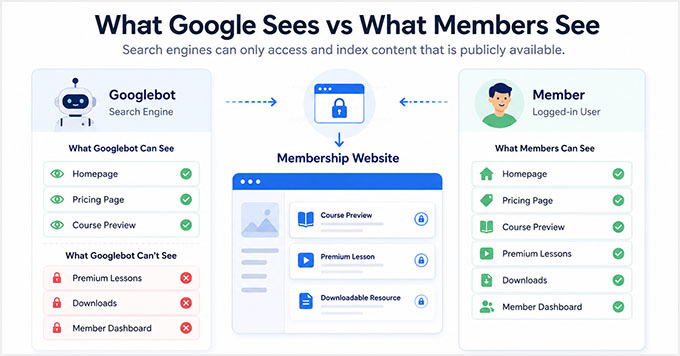
Google can index and rank content that is publicly available on your website, including teaser content that visitors can see before logging in or subscribing.
However, Google can’t access private member dashboards, locked lessons, premium downloads, or other content that requires a login.
That’s why many successful membership sites use a teaser-wall approach. This is one of the easiest and safest ways to improve SEO for gated content.
By making part of a page publicly visible, you give search engines enough information to understand and rank the content while keeping the full version reserved for members.
It’s also important to understand the difference between teaser content and cloaking. Cloaking is the practice of showing search engines different content than regular visitors see.
If done incorrectly, this can violate Google’s guidelines and create SEO problems.
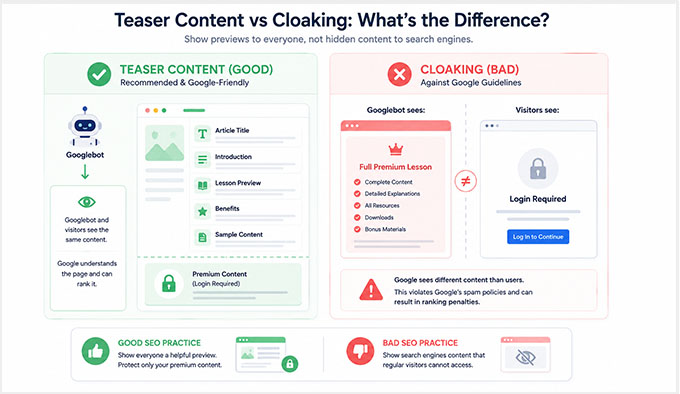
In this guide, I’ll focus on teaser-wall strategies where both visitors and Google see the same preview content.
Before You Start: Set Up Your Membership Site Properly
Before you start optimizing your membership site for SEO, it’s important to make sure your content is organized properly.
A poor site structure can hurt your SEO efforts. If you mix free and premium content together without clear organization, then both visitors and search engines may have a harder time understanding your site.
For the best results, keep your free and paid content clearly separated. This creates a better experience for your visitors and makes it easier to implement the SEO strategies
To do that, I recommend using MemberPress. It is the best WordPress membership plugin on the market and makes it easy to organize and protect your content.
It lets you create members-only areas, restrict access to specific content, and manage different membership levels from a single dashboard.
MemberPress also includes powerful features like partial content protection, content dripping, and flexible access rules. Plus, it works well alongside All in One SEO, making it a great choice for SEO-focused membership sites.
At WPBeginner, we use MemberPress to protect our free video courses. Visitors can browse the course library, but they need to register for a free account before they can access the lessons. This allows us to protect course content while still making it easy for new users to discover our training resources.
If you have not created your membership site yet, then see our complete guide on how to create a membership site with WordPress.
Now, let’s take a look at the best SEO strategies for membership sites. You can also use the links below to jump to a specific tip:
- Strategy 1: Use Teaser Content to Rank Gated Pages
- Strategy 2: Use Content Dripping Without Hurting SEO
- Strategy 3: Create Free Content That Brings Search Traffic
- Strategy 4: Strengthen Your Technical SEO Foundations
- Strategy 5: Noindex Low-Value Membership Pages
- Strategy 6: Use Internal Linking to Connect Free and Paid Content
- Strategy 7: Convert SEO Traffic Into Paying Members
- How to Measure SEO Success for Your Membership Site
- Frequently Asked Questions About Improving Membership Sites SEO
Important: These SEO strategies work together. Before moving on, it’s important to understand that these are not separate SEO methods where you choose only one strategy.
The most successful membership sites combine multiple SEO tactics together.
For example, they use teaser content to help pages rank in search results, create free content that targets valuable keywords, build internal links between free and premium content, and optimize their site to convert visitors into members.
Think of the following strategies as parts of a complete SEO system. Each one contributes to your site’s growth, but they deliver the best results when used together.
Strategy 1: Use Teaser Content to Rank Gated Pages
The easiest way to improve SEO for a membership site is to use teaser content.
Teaser content is a publicly visible preview that gives visitors and search engines a glimpse of what’s behind your membership wall.
For example, you might make the introduction, key takeaways, or first lesson available to everyone while reserving advanced lessons, downloads, and premium resources for members.
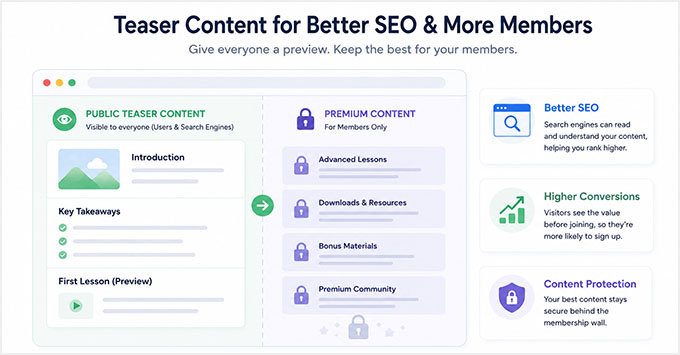
This approach works well because it gives Google content it can read and understand. As a result, your pages have a better chance of appearing in search results while your premium content remains protected.
I’ve also found that teaser content can improve conversions. When visitors can see the value of your content before signing up, they are often more willing to become members.
SEO Best Practices for Teaser Content
To get the best results, make sure your teaser contains enough information for both visitors and search engines to understand what the page is about.
Here are a few simple guidelines I recommend:
- Include your primary keyword naturally in the visible section.
- Add important headings and summaries above the paywall.
- Make the preview feel useful and complete on its own.
- Avoid hiding all of the important context behind the membership wall.
- Aim for at least 200–300 words of publicly visible content whenever possible.
The goal is to help visitors understand the value of your content while giving search engines enough information to rank the page.
How to Set Up Teaser Content in MemberPress
MemberPress makes it easy to create teaser content by showing part of a page or post to everyone while keeping the rest available only to members.
To get started, go to MemberPress » Rules in your WordPress dashboard and click ‘Add New.’
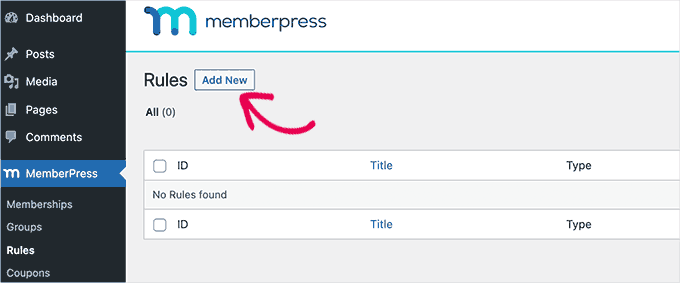
Next, choose the content you want to protect. MemberPress allows you to restrict individual posts and pages as well as entire categories, tags, or other groups of content.
This is especially helpful if you plan to create lots of members-only content in the future.
For example, you might restrict all posts in a “Premium Content” category instead of creating separate rules for each article.
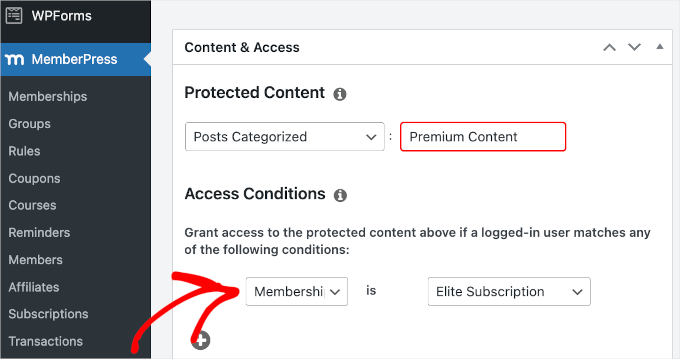
After selecting the content you want to protect, scroll down to the ‘Access Conditions’ section and choose which membership level should have access.
Next, enable content excerpts in the ‘Unauthorized Access’ section. This is what creates your teaser content.
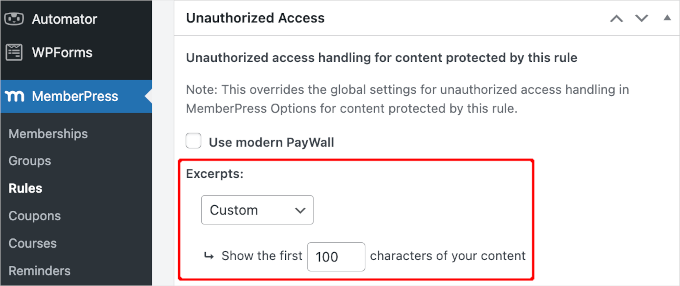
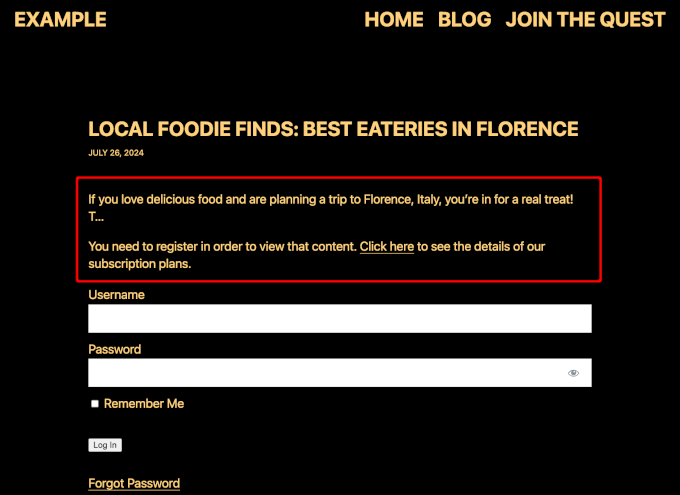
MemberPress allows you to show a portion of the protected content before the paywall appears. For example, you might display the introduction or the first few paragraphs of an article while keeping the rest locked. When the excerpt ends, users will see an ‘Unauthorized Access’ message.
🚀Pro Tip: I highly recommend customizing this message to include a direct link to your pricing or registration page to easily convert these readers into paying members.
When deciding how much content to reveal, make sure the preview provides enough context for visitors and search engines to understand what the page is about. At the same time, it should leave readers wanting to access the full content.
For detailed instructions, I suggest taking a look at our guide on creating a paywall in WordPress.
Do You Need Paywalled Content Schema?
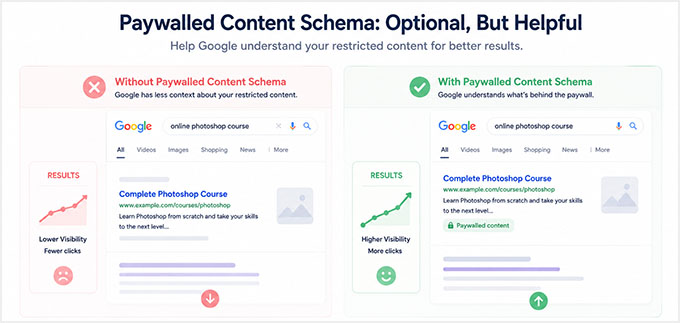
You may have heard about paywalled content schema markup and wondered if you need it. For most teaser-wall setups, the answer is no.
Paywalled content schema is structured data that tells Google which parts of a page sit behind a paywall. It uses properties like
isAccessibleForFree,hasPart, andcssSelectorto point at the restricted section.But it has one specific job, and it is not the job that most membership sites need.
This markup is built for sites that serve Googlebot the full gated content so it can be crawled and indexed, while keeping it locked for regular visitors.
The schema is what tells Google this is a legitimate paywall and not cloaking. That mostly applies to news and subscription publishers.
With the teaser-wall setup in this guide, you do not need it. Google and your visitors see the same public preview, and the full content is never served to anyone.
So there is no cloaking to clarify, and the markup gives you no ranking or rich-result benefit. If you are using a teaser wall, you can skip schema entirely and still rank your gated pages.
The one exception is a full-content setup, where you serve the whole article to search engines but lock it for visitors. If that is you, then you can add the markup with AIOSEO‘s Custom Schema Builder, making sure the
cssSelectormatches the actual class of your paywalled container.What to Do If Google Doesn’t Index Your Content
If your gated page isn’t appearing in Google search results, then this is usually caused by a simple configuration setting rather than the paywall itself.
Here’s a quick checklist I recommend working through before troubleshooting anything more advanced:
What to Check Where to Find It What to Look For Noindex Settings Edit the page and scroll to AIOSEO Settings » Advanced Make sure ‘No Index’ is disabled for the page. Teaser Content Visibility Open the page in an incognito browser window Confirm that visitors can view the teaser content without logging in. Robots.txt Rules All in One SEO » Tools » Robots.txt Editor Check that the page or content section isn’t blocked from search engines. URL Inspection Tool Google Search Console » URL Inspection Test the page and see whether Google can crawl and index it successfully. Request Indexing Google Search Console » URL Inspection If everything looks correct, click Request Indexing to ask Google to recrawl the page. If the page still isn’t appearing in search results, then you may want to look at our following guides:
- Why Did My WordPress Site Get De-Indexed From Google?
- How Do I Get My WordPress Site Listed on Google? (Beginner’s Guide)
- How to Check If Your WordPress SEO Is Actually Working
Strategy 2: Use Content Dripping Without Hurting SEO
Once you’ve set up teaser content, the next logical step is deciding when members get access to your premium content.
Many membership site owners do this using content dripping, which gradually releases content over time instead of making everything available immediately.
For example, if you’re running an online course, then you might unlock one lesson each week. Similarly, you could release new training modules a certain number of days after a member signs up.
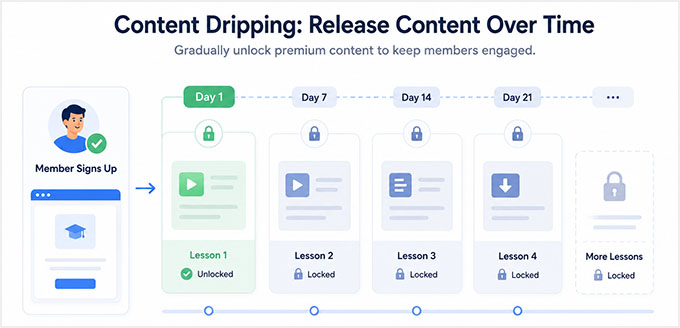
Content dripping can help improve engagement and keep members coming back to your site. However, it’s important to understand how it affects SEO.
How Content Dripping Affects SEO
Content dripping isn’t bad for SEO, but there are a few things to keep in mind:
- Google can’t index content that hasn’t been released yet.
- Fully hidden lessons and modules typically won’t rank in search results.
- Dripped content usually becomes eligible for indexing only after it becomes accessible.
For this reason, I recommend creating teaser content for upcoming lessons and modules before they are released.
Even a short introduction, lesson summary, or overview page can help search engines understand what the content is about while members wait for the full lesson to unlock.
💡 Expert Tip: Optimize Your Video Content for Search
If your membership site includes video courses, then don’t forget about video SEO.
One strategy I’ve found particularly effective is creating a public landing page for each premium video or course module.
You can include a short teaser clip, lesson summary, transcript, or key takeaways while keeping the full training reserved for members.
This gives search engines content they can index and helps potential members understand the value of your course before signing up.
This allows you to build search visibility early without giving away your premium content.
How to Configure Drip Rules in MemberPress
MemberPress makes it easy to schedule content releases.
Simply go to MemberPress » Rules and edit the rule that controls access to your protected content. Next, scroll to the ‘Drip / Expiration’ setting and enable content dripping.
You can then choose how and when content should become available. For example, MemberPress allows you to:
- Release content on a specific date.
- Unlock content a certain number of days after signup.
- Create recurring release schedules for ongoing training programs.
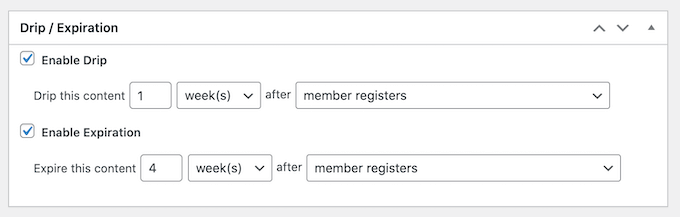
Make sure that you also create teaser content for any lessons or membership content that won’t be released right away.
This helps search engines discover and understand those pages before the full content becomes available to members.
For detailed instructions, see our guide on how to add drip content in WordPress.
Strategy 3: Create Free Content That Brings Search Traffic
One mistake I’ve seen many membership site owners make is putting everything behind a paywall.
While that may seem like the best way to increase memberships, it can actually make it much harder to grow your organic traffic. After all, if most of your content is locked, then search engines have fewer opportunities to discover and rank your website.
That’s why the most successful membership sites don’t gate everything.
Instead, they use free content to attract visitors from search engines and then encourage them to join their membership program for more advanced resources.
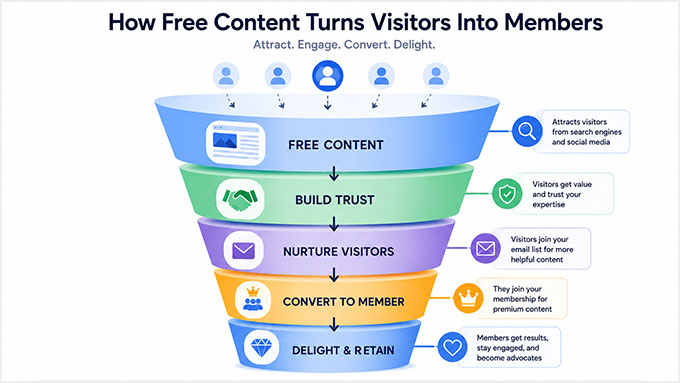
Free content can help you:
- Attract search traffic from Google.
- Reach people who are new to your topic.
- Earn backlinks from other websites.
- Build trust with potential members.
- Introduce visitors to your premium offerings.
Think of your free content as the front door to your membership site. It helps new visitors discover your expertise, while your premium content gives them a reason to become members.
Use Keyword Research to Build a Membership Funnel
When planning your content strategy, I recommend targeting broad informational keywords with free content and reserving your most valuable training, templates, and systems for members.
For example, if you run a membership site that teaches people how to build and grow websites, then your content funnel might look something like this:
Free SEO Content Premium Membership Content How to Start a Membership Site Full video course Best WordPress Membership Plugins Complete setup templates Membership Site SEO Tips Advanced SEO training This approach allows your free content to rank in search results and attract new visitors while your premium content provides the deeper value that encourages people to join.
Decide What Should Be Free vs. Premium
One question I hear often is: “How do I decide what to make free and what to put behind a paywall?”
A simple rule is to make content free when its main purpose is attracting new visitors. Then, reserve your most valuable implementation resources, systems, and training for members.
Here’s a framework that works well for many membership sites:
Make It Free Gate It Behind a Membership Content targeting broad search keywords Advanced implementation guides Beginner tutorials and educational content Premium courses and training programs Content designed to attract backlinks Templates, worksheets, and downloads Top-of-funnel educational resources Proprietary systems and frameworks Content that introduces your expertise Member-exclusive tools and resources This gives you the best of both worlds. Your free content helps you grow traffic and reach new audiences, while your premium content provides a strong reason for visitors to upgrade.
Build Trust With E-E-A-T Signals
Creating free content isn’t just about getting more traffic. It’s also one of the best ways to build trust with potential members.
This is especially important because many membership sites sell access to expertise, training, coaching, or specialized knowledge. Before someone pays for a membership, they want to know why they should trust you.
That’s where E-E-A-T comes in. It stands for Experience, Expertise, Authoritativeness, and Trustworthiness.
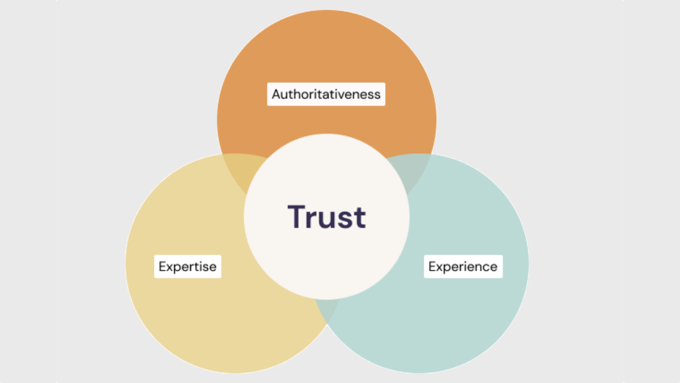
One of the easiest ways to improve E-E-A-T is to demonstrate real-world experience. Whenever possible, share examples from your own projects, testing, results, or case studies.
You can also strengthen trust by:
- Adding detailed author bios.
- Highlighting relevant credentials and expertise.
- Including member testimonials and success stories.
- Displaying reviews and social proof.
- Sharing real examples of your methods in action.
At WPBeginner, we do this by sharing our hands-on experience with the tools and strategies we recommend.
We also have dedicated author pages, editorial guidelines, and review processes that help readers understand who created the content and why they can trust it.
If you’re just getting started, then I recommend checking out the following tutorials:
- How to Setup Author SEO in WordPress to Boost Your Google E-E-A-T
- How to Get Your WordPress Content Cited by AI Tools (My Expert Tips)
- What Is Google E-E-A-T? A Detailed Guide to WordPress Websites
Strategy 4: Strengthen Your Technical SEO Foundations
Even the best content strategy can struggle if your website has technical SEO problems.
Some membership site owners spend a lot of time creating teaser content, publishing SEO-focused articles, and building premium courses, only to discover that technical issues were holding their rankings back.
Search engines need to be able to crawl, understand, and access your content efficiently. Here are a few technical SEO basics I recommend checking before moving on to more advanced strategies:
Technical SEO Factor Why It Matters How to Improve It HTTPS Security Protects user data and is a Google ranking signal. Install an SSL certificate and make sure your site loads over HTTPS. Site Speed Faster websites provide a better user experience and often rank higher in search results. Use a caching plugin, optimize images, and choose a fast WordPress hosting provider. Mobile-Friendly Design Google primarily uses the mobile version of your website for indexing and rankings. Use a responsive WordPress theme and test your site on different screen sizes. Broken Links and 404 Errors Broken pages create a poor user experience and can waste crawl budget on very large sites. Regularly audit your website and fix or redirect broken URLs using the free Broken Link Checker plugin by AIOSEO. XML Sitemaps Help search engines discover and index your content more efficiently. Use AIOSEO to generate and maintain XML sitemaps. You don’t need to perfect every technical SEO setting before your membership site can rank.
Start by fixing the basics listed above. Once your site is secure, fast, mobile-friendly, and easy for search engines to crawl, you’ll have a much stronger foundation for the membership site SEO.
Strategy 5: Noindex Low-Value Membership Pages
When most people think about SEO, they focus on getting more pages indexed.
However, an important part of SEO is helping search engines focus on your most valuable content. That’s where noindexing comes in.
By preventing low-value pages from appearing in search results, you help keep your index focused on the pages that can actually bring traffic to your website. Crawl budget can also be a factor, but that mainly matters for very large websites with thousands of pages, so most membership sites do not need to worry about it.
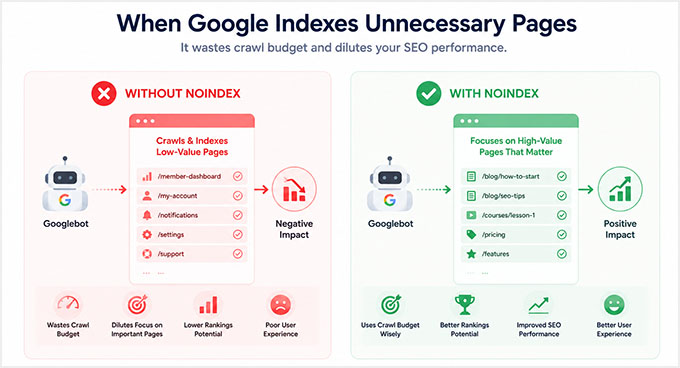
Why Noindexing Helps Membership Site SEO
Many membership sites contain pages that serve an important purpose for members but provide little value in search results.
For example, a login page is useful if someone already has an account. However, it doesn’t answer search queries or help new visitors discover your website.
The same is true for account pages, member dashboards, checkout pages, and thank-you pages.
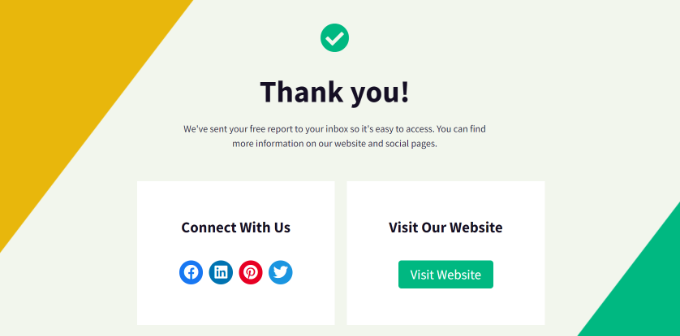
When these pages appear in search results, they pull attention away from your course previews, blog posts, landing pages, and other content designed to attract search traffic.
Noindexing low-value pages helps keep your index focused on content that can generate rankings, clicks, and new memberships.
Which Pages Should Be Noindexed?
As a general rule, I recommend noindexing pages that you designed for existing members rather than new visitors.
Here are some common examples:
Page Type Why It Should Be Noindexed Login Pages Useful for members, but provide little value in search results. Account Pages Contain user-specific information and are not intended for public discovery. Checkout Pages Designed for conversions rather than search traffic. Thank-You Pages Only relevant after a purchase or registration. Member Dashboards Usually contain private content and member navigation. On the other hand, you typically should not noindex content that can attract new visitors, such as:
- Blog posts
- Course landing pages
- Teaser content pages
- Resource hubs
- SEO-focused content targeting keywords
These pages are often responsible for bringing new traffic into your membership funnel.
How to Noindex Pages in AIOSEO
The easiest way to noindex a page in WordPress is with All in One SEO.
To get started, edit the page you want to remove from search results. Next, scroll down to the ‘AIOSEO Settings’ area and switch to the ‘Advanced’ tab.
From here, locate the ‘Robots Meta’ settings and toggle the ‘Use Default Settings’ switch to ‘OFF’.
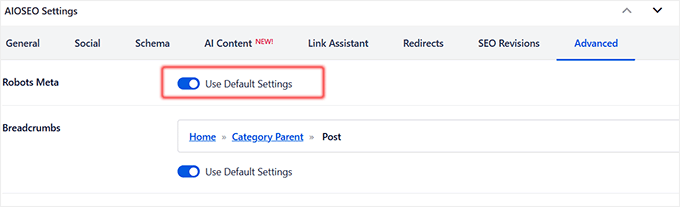
This will reveal the manual checkboxes where you have to check the ‘No Index’ option.
Once you’ve saved or updated the page, AIOSEO will add the appropriate noindex directive so search engines know not to include that page in their search results.

Keep in mind that it can take time for Google to recrawl your page and process the noindex directive. This might take anywhere from a few days to several weeks.
If you need more information, you can also see our guide on how to stop search engines from crawling your WordPress site.
Strategy 6: Use Internal Linking to Connect Free and Paid Content
Up until now, you’ve learned how to attract visitors with free content and protect your premium resources behind a membership wall.
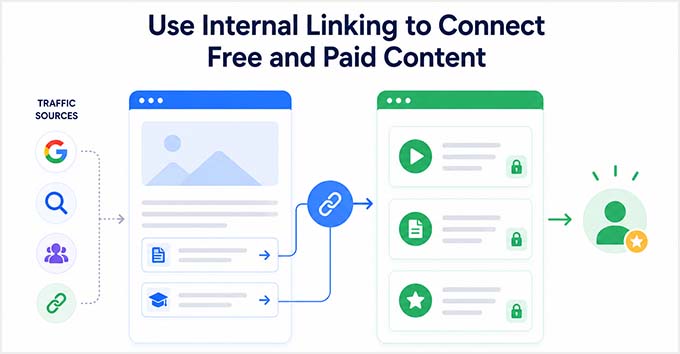
The next step is making sure those visitors can easily find their way from your free content to your paid offerings.
That’s where internal linking comes in.
Many membership site owners create great blog posts and resource pages that attract search traffic, but they forget to connect that traffic to their membership program.
As a result, visitors consume the free content and leave without ever discovering the premium resources available on the site.
Why Internal Links Matter
Internal links are links that point from one page on your website to another page on the same site. They help SEO in several ways by:
- Allowing Google to understand the structure of your website.
- Passing authority between related pages.
- Helping search engines discover important content.
- Guiding visitors toward your membership offers and conversion pages.
Think of internal links as bridges between your free content and your premium content.
For example, someone might find your website through a beginner tutorial they discovered on Google. A well-placed internal link can then guide them to a premium course, membership landing page, or exclusive training resource.
Internal Linking Best Practices for Membership Sites
One of the simplest ways to improve your membership site’s SEO and conversions is to create clear paths between related content.
Here are a few examples:
Free Content Link To Blog posts Premium course pages Beginner tutorials Membership signup pages Resource guides Premium templates and downloads Course previews Full membership programs Free lessons Advanced training modules When adding internal links, use descriptive anchor text whenever possible. This helps both visitors and search engines understand what they’ll find after clicking the link.
For example, instead of using generic text like “Click here”, you could use:
‘Get the full training inside our membership program.’
This link is more helpful because it clearly explains the benefit of clicking through. For more tips, you may want to see our guide on internal linking for SEO.
Create a Path From Traffic to Memberships
One simple rule I recommend is this:
Every high-traffic page should guide visitors toward a monetized page.
That doesn’t mean filling your content with sales pitches. Instead, look for natural opportunities to recommend a relevant course, membership tier, premium resource, or training program.
At WPBeginner, we use internal links and content clusters throughout our blog to help readers discover related tutorials, tools, and resources.
The same strategy works extremely well for membership sites because it helps turn search traffic into paying members.
Strategy 7: Convert SEO Traffic Into Paying Members
Getting more traffic from Google is important, but traffic alone doesn’t grow a membership business.
I’ve seen membership site owners spend months improving their rankings, only to discover that very few visitors were actually becoming members.
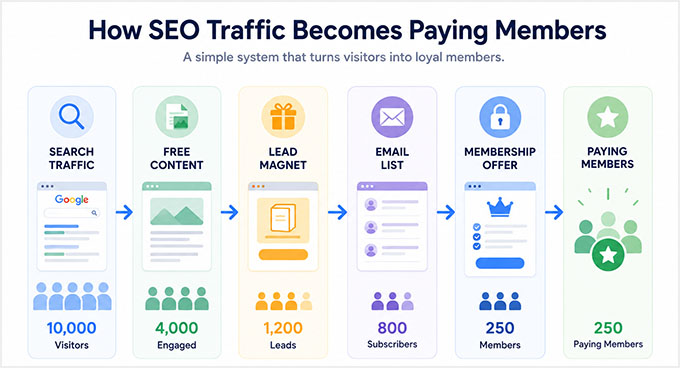
To grow your membership site, you need a system that turns search traffic into subscribers and paying members.
Use OptinMonster to Convert Organic Traffic
One of the easiest ways to do this is with OptinMonster.
It’s the best lead generation and conversion optimization tool on the market, and we’ve used it across several of our websites to grow email lists, promote offers, and bring visitors back to our content.
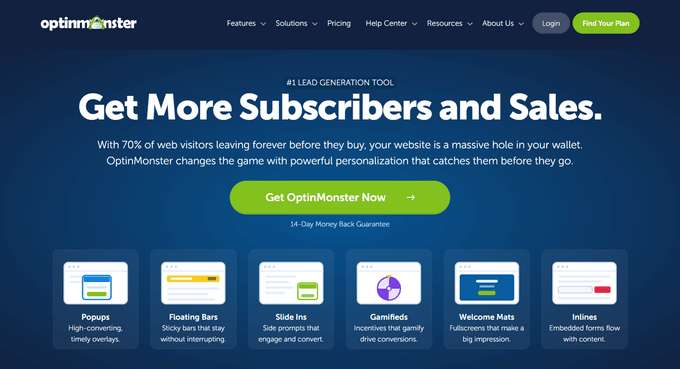
OptinMonster also integrates with MemberPress, allowing you to automatically target visitors who aren’t members yet. This makes it easy to promote memberships, free trials, and premium resources at exactly the right moment.
Here are a few campaign types that work particularly well for membership sites:
Exit-Intent® Popups
Exit-Intent® technology detects when a visitor is about to leave your website and displays a targeted offer before they exit.
This can be a great opportunity to offer:
- A free trial
- A membership discount
- A free course
- A bonus resource
For example, if someone has just finished reading one of your tutorials, you could offer them access to a premium course or a limited-time membership discount before they leave your site.

Inline Content Upgrades
Inline content upgrades appear directly inside your content, making them feel like a natural next step rather than an advertisement.
For example, if you’re writing a blog post about membership site SEO, then you could promote:
- A downloadable checklist
- A premium template
- A complete video course
- Member-only training resources
Because these offers are highly relevant to the content visitors are already reading, they often convert very well.

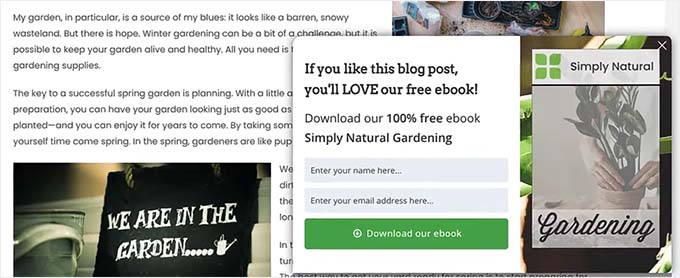
Scroll-Based Slide-ins
Scroll-based slide-ins appear after a visitor has engaged with your content by scrolling down the page.
Since these campaigns are triggered after someone has already shown interest in your content, they tend to feel less intrusive than traditional popups.
For example, after a visitor reads 50% or 75% of an article, you could display a slide-in promoting:
- Your membership program
- A free trial
- An upcoming webinar
- Premium training resources
This can be an effective way to increase signups without disrupting the user experience.
Recommended Membership SEO Funnel
By now, you’ve seen that successful membership site SEO is about more than rankings.
The goal is to create a clear path that moves visitors from search engines to your membership program. A simple funnel might look like this:
SEO Traffic → Free Content → Teaser Preview → OptinMonster Campaign → Membership Signup
Here’s how each step works:
Step Purpose SEO Traffic Visitors discover your website through Google. Free Content Helpful articles build trust and answer questions. Teaser Preview Visitors get a glimpse of your premium content. OptinMonster Campaign Targeted offers encourage visitors to take action. Membership Signup Visitors become members and gain access to premium resources. Each step supports the next one. That’s why the most successful membership sites don’t rely on a single tactic.
Instead, they combine SEO, free content, teaser pages, internal linking, and conversion optimization into a complete system that attracts visitors and turns them into members.
How to Measure SEO Success for Your Membership Site
After putting in the work to optimize your membership site for SEO, you’ll want to know whether those efforts are actually paying off.
Tracking your results can help you identify what’s working, uncover new opportunities, and focus your time on the strategies that bring in the most members.
Key SEO Metrics to Track
When reviewing your SEO performance, I recommend paying attention to these metrics:
Metric Why It Matters Organic Traffic Shows how many visitors are finding your site through search engines. Keyword Rankings Helps you track how well your content is performing for target keywords. Traffic to Free and Teaser Content Shows which pages are attracting potential members. Membership Signups Measures how many visitors are joining your membership program. Conversion Rate Helps you understand how effectively your content turns visitors into members. Backlinks Indicates whether other websites are recommending and linking to your content. Rather than focusing on rankings alone, I recommend paying close attention to membership signups and conversion rates.
After all, the goal isn’t just to get more traffic, it’s to grow your membership business.
Track SEO Performance With MonsterInsights
The easiest way to track SEO performance in WordPress is with MonsterInsights.
It’s the best Google Analytics plugin for WordPress, and we use it across our partner brands to understand how visitors find and interact with our websites.
MonsterInsights brings Google Analytics data directly into your WordPress dashboard, so you don’t have to spend time digging through complicated reports.
For membership sites, this makes it much easier to answer questions like:
- Which blog posts attract the most search traffic?
- Which teaser pages generate the most views?
- Which content drives the most membership signups?
- Where are your highest-converting visitors coming from?
You can also set up conversion tracking to measure how many visitors complete important actions on your site, such as registering for a free account, starting a trial, or purchasing a membership.
By regularly reviewing these reports, you’ll quickly identify which content attracts the most visitors and which pages do the best job of turning those visitors into members.
If you’d like help getting started, then see our guide on how to see if your WordPress SEO is actually working.
Frequently Asked Questions About Improving Membership Sites SEO
Membership site SEO can feel a little different from traditional SEO, especially when you’re working with paywalls, gated content, and member-only areas.
Here are some of the questions I hear most often from membership site owners.
Does Google penalize gated content?
No, Google does not penalize properly implemented gated content.
Many successful membership sites use paywalls and member-only areas. Problems typically come up when websites use deceptive techniques like cloaking that show different content to search engines and visitors.
As long as you’re using teaser content and following Google’s guidelines, gated content can work well for SEO.
Can Google index content behind a login wall?
No, Google cannot access content that requires a login.
Since Googlebot can’t create an account or sign in to your membership site, it generally won’t be able to crawl content hidden behind a login wall.
That’s why teaser content is so important. It gives search engines enough information to understand and rank your pages.
Will ChatGPT or Google AI Overviews surface my gated content?
No. AI search tools like ChatGPT, Perplexity, and Google AI Overviews can’t log in or subscribe, so just like Googlebot, they can’t reach content behind a login or paywall. Your gated content stays invisible to them, and that’s expected.
Your public teaser content is a different story. These tools can read and cite it, so the same teaser strategy that helps you rank in normal search also makes you eligible for AI answers. Google AI Overviews use the standard search index and the normal SEO rules, so there’s no separate AI optimization or opt-in to set up.
Should I noindex login and account pages?
Yes, in most cases you should noindex login and account pages. These pages provide little value in search results and are designed for existing members rather than new visitors.
What is the difference between gated and paywalled content?
Gated content requires users to take an action before accessing the content. That action might be creating an account, joining an email list, or filling out a form.
Paywalled content is a specific type of gated content that requires users to purchase a subscription or membership before they can access it.
How much content should I show before the paywall?
I recommend showing at least 200–300 words of content before the paywall. Another common approach is to make roughly 10–20% of the content publicly visible.
Whatever approach you choose, make sure the visible section includes important context, headings, and your target keyword so search engines can understand what the page is about.
Will content dripping hurt SEO?
No, content dripping does not directly hurt SEO. However, unreleased content typically can’t rank until it becomes accessible to search engines.
That’s why I recommend creating teaser pages for upcoming lessons and training modules whenever possible.
Do backlinks matter for membership site SEO?
Yes, backlinks remain one of the most important ranking factors for membership sites.
The challenge is that premium content often sits behind a paywall, making it harder for other websites to link to it. That’s why I recommend creating high-quality free resources that naturally attract backlinks, such as:
- Beginner guides and tutorials
- Statistics and research pages
- Free tools and resources
- Downloadable checklists and templates
- Guest posts on relevant websites
Focus on earning backlinks to your free content, then use internal links to guide those visitors toward your membership offers and premium resources.
I hope this article helped you learn how to rank your gated content. You may also want to see our guide on using a video membership site to grow your email list and our automation tricks to reduce churn on your membership site.
If you liked this article, then please subscribe to our YouTube Channel for WordPress video tutorials. You can also find us on Twitter and Facebook.
The post SEO for Membership Sites: 7 Strategies to Rank Gated Content in 2026 first appeared on WPBeginner.
-

El narrador Pablo Albo lleva el 35º Maratón de los Cuentos al Hospital de Guadalajara

El Hospital Universitario de Guadalajara ha recibido una nueva sesión del Maratón Viajero, una iniciativa integrada en la trigésimo quinta edición del Maratón de los Cuentos. El acto ha contado con la voz principal del narrador Pablo Albo, quien ha compartido historias con los pacientes y el personal del centro. Esta actividad busca acercar la narración oral a las personas que, por motivos de salud, no pueden desplazarse a los escenarios principales de la ciudad durante el evento literario.
La jornada ha estado marcada por el característico humor manchego de Albo, de raíces alicantinas y albaceteñas, quien es el encargado tradicional de inaugurar las primeras narraciones de esta cita cultural. El evento, organizado de forma anual por el Seminario de Literatura Infantil y Juvenil de Guadalajara, ha contado además con la participación activa de los estudiantes del IES Carmen de Burgos Seguí del municipio de Alovera. En su formato principal, el Maratón ofrecerá 46 horas ininterrumpidas de cuentos con profesionales y aficionados de diversos puntos de España y del extranjero.
Archivo y evolución histórica
El repaso al archivo histórico de liberaldecastilla.com durante el último año refleja cómo el Maratón de los Cuentos ha consolidado su estrategia de descentralización en la provincia. La visita al Hospital Universitario no es un acto aislado, sino que forma parte de una programación expansiva que las ediciones recientes han reforzado de manera sistemática. El Seminario de Literatura Infantil y Juvenil ha priorizado convertir el Maratón Viajero en una herramienta de inclusión y cohesión, llevando la tradición oral más allá del Palacio del Infantado a residencias, centros sociales y pueblos vecinos.
Esta trayectoria demuestra una clara evolución en la función comunitaria del festival literario. Mientras que en sus primeras décadas el esfuerzo se centraba principalmente en batir récords de horas continuadas de narración, las coberturas recientes evidencian un interés cada vez mayor por la accesibilidad cultural. La integración de centros educativos de la provincia, como la participación del instituto de Alovera en esta 35ª edición, subraya el relevo generacional que la organización fomenta año tras año para garantizar la supervivencia de esta fiesta de la palabra en Guadalajara.