August 16-19, 2026 | Phoenix Convention Center, Phoenix, Arizona
WordCamp US 2026 returns for another year, this time in Phoenix, Arizona, for four days, August 16 to 19. It comes at a moment of real energy for WordPress, as artificial intelligence reshapes everyday workflows, the business of building and maintaining sites is shifting, and new people keep discovering the platform every day. Four tracks address this moment, covering AI, Honing Your Skills, Technical WordPress, and Beginner WordPress. Between them, there is something for everyone, whether you lead an agency, freelance for local clients, write code for a living, or are building your very first site. Whatever draws you in, you will leave Phoenix better equipped and better connected than ever.
Phoenix itself rewards anyone who adds a day or two to their trip. The capital of Arizona sits in the Sonoran Desert and pairs a lively downtown with a rich arts and food scene. The Roosevelt Row arts district is known for its galleries, murals, and independent restaurants. It is also home to one of the largest art walks in the region. Nearby, Chase Field and the Footprint Center host professional baseball and live shows, and the surrounding desert offers striking scenery at places like Papago Park and the Desert Botanical Garden.
Start with Contributor Day
The week begins with Contributor Day, a full day set aside for giving back to the project that makes everything else possible. Attendees will gather in teams to improve WordPress itself, from Core code and documentation to design, training, accessibility, and translation.
WordPress is so unique because we’re not just a product; we’re a movement.
Matt Mullenweg, WordPress Cofounder
Contributor Day is open to everyone, whatever your skills, and whether or not you have ever contributed before. Come and experience the open source collaboration that is at the heart of the project. Signing up in advance helps us prepare our veteran contributors and provide you with the best experience.
Explore Real-World Projects on Showcase Day
Day 2, Showcase Day, is dedicated to real-world WordPress projects and focuses on how teams develop features, manage publishing, and run demanding sites at scale. It brings to life the kind of work collected in the WordPress Showcase, the directory of standout sites built on the platform, from global brands like Disney to community publishers and institutions like NASA. Past WordCamp US Showcase days have brought teams from the likes of Wikimedia and CANCOM to explain how they manage large, high-traffic systems. Other sessions took a builder’s perspective on catching bugs faster with automated testing and even running the Block Editor inside a custom app.
Dive Into Two Conference Days
The two main conference days will bring a full slate of sessions across four tracks. First among them is the AI track, which treats the technology as a tool to handle with care rather than a headline to chase. Its sessions set guardrails for AI-assisted development, prepare for a web where AI agents become the visitors a site must serve, and weigh the legal and ethical questions of putting AI tools in the hands of clients. Speakers from companies like Elementor will be taking a look at where the web is heading, while keeping the focus on what teams can adopt today without giving up control of their work.
The Technical WordPress and Honing Your Skills tracks cover the craft and business of building with WordPress. On the technical side, sessions dig into modern development workflows, automated testing with tools like the browser-based WordPress Playground, and plugin pipelines. The Honing Your Skills track adds practical guidance on pricing, maintenance, and how the agency model is changing as clients ask for more. The Beginner WordPress track keeps the door open for newcomers, with approachable sessions that make your first WordCamp less daunting. Hands-on work runs through all of these tracks, so alongside the talks, attendees will find workshops and working sessions where they can build something real and leave ready to apply it to their own projects.
Not all of the value happens in the session rooms. On the show floor, the Happiness Bar is a free, drop-in help desk where you can sit down with a volunteer WordPress expert and work through whatever has you stuck. The Sponsor Hall next door is where many of the best unplanned conversations happen, and its Career Corner gives anyone weighing their next move a relaxed place to browse the job board, meet company reps, and see who is hiring across the ecosystem.
Plan Your Trip to Phoenix
Getting to Phoenix is straightforward. The Phoenix Convention Center sits in the heart of downtown, less than five miles from Phoenix Sky Harbor International Airport (PHX) and about 15 minutes away on the Valley Metro light rail. WordCamp US has a room block at the Sheraton Phoenix Downtown, close to the convention center, so book your hotel before the block fills, and reserve your ticket if you have not already. The full event lineup and details live on the WordCamp US 2026 site, and the conference closes with an evening social before everyone heads home.
Whether attending in person or following along online, share your experience and help welcome others to the WordPress community. Use the #WCUS and #WordPress hashtags to tell your story on social.
El Gobierno de Castilla-La Mancha ha definido la programación de otoño de la Red de Artes Escénicas, que llevará un total de 28 espectáculos a seis municipios de la provincia de Guadalajara desde este mes de julio hasta el próximo 6 de enero. Con una financiación regional de 48.593 euros, que será complementada por los propios consistorios, la iniciativa desplegará su agenda cultural en Cabanillas del Campo, El Casar, Fontanar, Horche, Yunquera de Henares y la capital alcarreña.
Desglose de la oferta cultural
La cartelera abarca disciplinas diseñadas para todos los públicos, abriendo espacio al teatro, el circo, la música y los títeres. En Guadalajara capital, que acogerá seis actuaciones, el peso recae sobre propuestas musicales destacadas como ‘El Mesías de Händel’ y el concierto de Kiko Veneno. La oferta de la ciudad se completa con ‘Lucía di Lammermoor’ y las obras teatrales ‘La pasión infinita’, ‘La vida extraordinaria’ y ‘Bestseller. La obra que Lorca nunca escribió’.
En la provincia, El Casar lidera el volumen de programación con siete espectáculos, apostando por formatos abiertos como el teatro de calle con ‘Alicia en el país de las maravillas’, además de actuaciones de circo. Cabanillas del Campo suma seis citas culturales que incluyen títeres y marionetas; Yunquera de Henares acogerá cuatro propuestas (tres obras de teatro y una de circo); Fontanar ha programado tres espectáculos, y Horche ofrecerá dos representaciones teatrales.
Para cubrir esta demanda, los escenarios de Guadalajara recibirán a 12 compañías castellanomanchegas y a nueve agrupaciones procedentes del resto del país. Según ha explicado el delegado provincial de Educación, Cultura y Deportes, Ángel Fernández-Montes, este modelo de colaboración económica con los ayuntamientos garantiza una programación estable y democratiza el acceso a las artes escénicas en el territorio. A nivel autonómico, la temporada movilizará 121 espectáculos, de los cuales 82 son producciones de la región, lo que supone una inyección directa para el empleo en el sector cultural.
Hemeroteca y contexto histórico
Históricamente, la Red de Artes Escénicas y Musicales de Castilla-La Mancha se ha consolidado como la principal herramienta de supervivencia cultural para los municipios de tamaño medio en Guadalajara. Siguiendo el rastro de ediciones pasadas en el archivo de Liberal de Castilla, se observa que este circuito cofinanciado es el único mecanismo que permite a los ayuntamientos locales asumir cachés de espectáculos de primer nivel y de artistas reconocidos que, fuera de este paraguas, quedarían restringidos a las grandes capitales.
La evolución del programa en los últimos años refleja un cambio en los patrones de consumo cultural de la provincia. La decisión de municipios como El Casar y Fontanar de apostar firmemente por los espectáculos de calle y el circo no es casual; responde a una estrategia ya probada en temporadas anteriores para sacar la cultura de las casas de la cultura y llevarla a las plazas, facilitando la integración de los vecinos. Más allá del entretenimiento, la Red mantiene su papel original: funcionar como el soporte económico básico para que las compañías teatrales castellanomanchegas puedan mantener su actividad durante los meses de otoño e invierno.
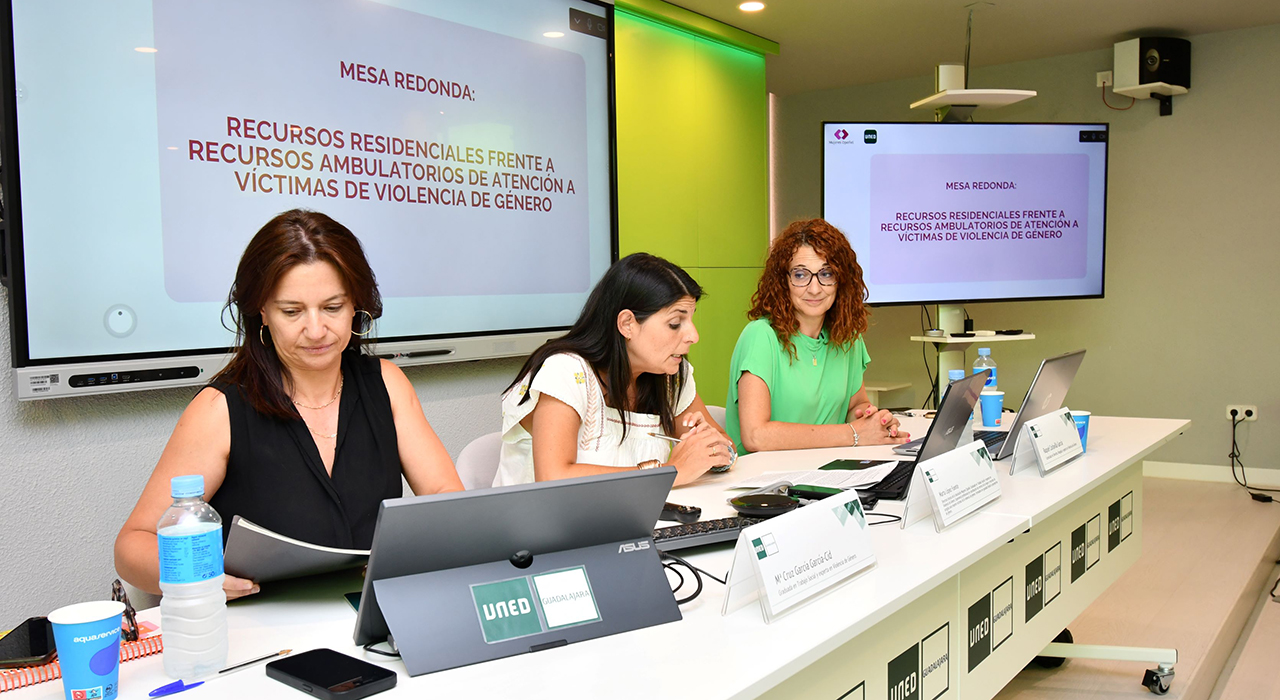
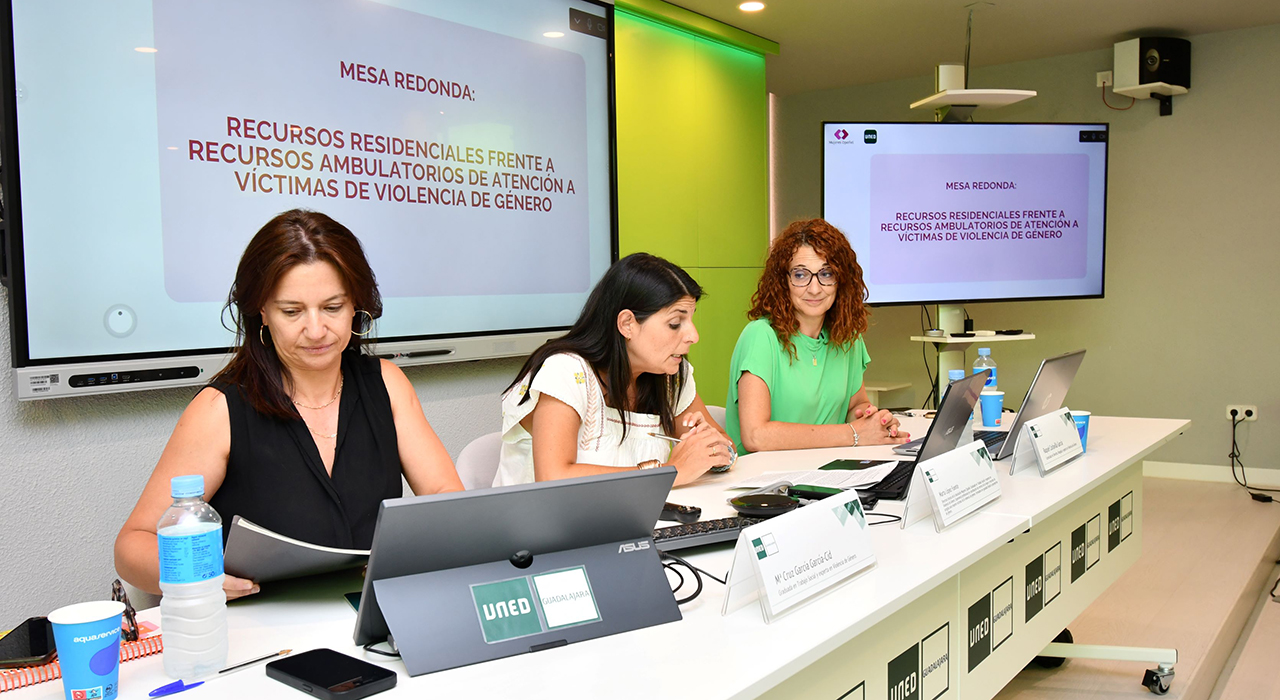
UNED Guadalajara ha concluido su cuarto curso de verano, que ha ofrecido una visión práctica e integral sobre la violencia machista. Bajo el título ‘Violencia de género: perspectivas, recursos e intervención integral’, diferentes expertos del ámbito jurídico, psicológico y social, especializados en violencia de género e igualdad, han abordado este problema desde el momento inicial -la denuncia o la llegada a un recurso de acogida-, hasta el proceso judicial, sin olvidar la asistencia jurídica y el impacto en la salud psicológica de la víctima, el acompañamiento profesional y emocional, los recursos que existen o la violencia vicaria.
“El curso ha pretendido ofrecer un enfoque multidisciplinar unificando teoría y práctica profesional”, afirma el director del curso, Pedro Javier Amor Andrés, Profesor Titular del Departamento de Psicología de la Personalidad en la UNED.
Una mujer, un caso
A lo largo de ocho sesiones, los asistentes -que han seguido el curso de forma presencial y online-, han podido conocer en profundidad qué significa el concepto de violencia de género y la importancia de tener una mirada interseccional del problema, una perspectiva amplia e integral que tenga en cuenta que existen muchos condicionantes y diferentes discriminaciones que hacen que la violencia se viva de forma individualizada. No todas las violencias son iguales, por tanto, no todas las mujeres la viven de la misma forma y su proceso es diferente.
Se ha prestado atención también a analizar la figura del maltratador, hombres que suelen tener «distorsiones cognitivas sobre la víctima, una desconexión moral y un déficit de habilidades de comunicación (asertividad) y solución de problemas», explica Amor Andrés. Y se ha dedicado también una sesión a explicar la “decisión vital” que implica la denuncia por parte de la víctima de violencia de género: “es un punto de inflexión», afirma Raquel Carlavilla, abogada de la Asociación Mujeres Opañel, porque “significa que ya no va a estar sola, se activa el sistema institucional de protección y es, además, una connotación emocional”.
El curso también ha permitido reflexionar sobre la importancia de sensibilizar a los adolescentes sobre violencia de género, entendiendo que actualmente, para prevenir este tipo de conductas, “ya no sirve tanto el mensaje como centrarse en la interpretación y conectar con la narrativa juvenil actual”, afirma la psicóloga Ani Hinchado.
Mirar, intervenir y acompañar mejor
Además, se han revisado los diversos recursos de acogida que existen para víctimas, diferenciando entre ambulatorios y residenciales, siempre con el riesgo como factor principal de medida, así como las herramientas para el acompañamiento y la intervención psicosocial. Finalmente, se ha reparado en la atención jurídica a las víctimas desde el centro asesor de la mujer y el impacto psicológico que el proceso judicial supone para las víctimas, que en muchos casos se sienten culpables, además de la importancia de que exista una buena deontología profesional.
“Lo importante es formarse también para mirar, intervenir y acompañar mejor “, afirma Marta López, coordinadora del curso, que es directora técnica de la Asociación Mujeres Opañel (AMO). “Este curso nos ha recordado que la intervención en violencia de género exige conocimiento, sensibilidad y compromiso; pero, sobre todo, exige situar siempre en el centro a las mujeres, sus derechos, sus tiempos y su capacidad para reconstruir un proyecto de vida libre de violencia”.
El quinto y último curso de verano de UNED Guadalajara de esta 20ª edición arranca este lunes 13 de julio con el ciclo ‘Energía hoy: reto, crisis y futuro’, dirigido por Mercedes Ibarra, donde se aportará una visión integral y actualizada del sistema energético.
In this Open Web Conversations episode, host Anne Bovelett chats with lawyer Carlo Piana about open source software’s legal challenges, AI’s impact on coding, and the importance of proper licensing and attribution.
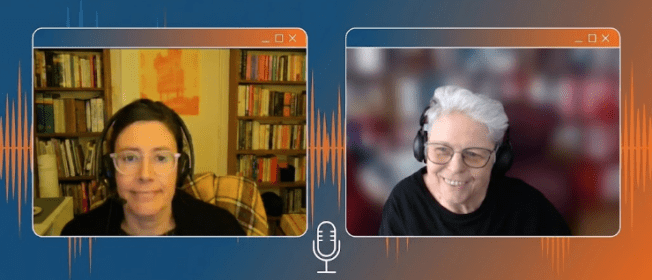
In episode 132 of the Gutenberg Changelog podcast, host Birgit Pauli-Haack and guest Ellen Bauer explore the latest updates within the WordPress ecosystem. The conversation centers on the releases of Gutenberg 23.4 and 23.5, the recent WordPress 7.0.1 maintenance update, and the strategic roadmap for the upcoming WordPress 7.1.A significant portion of the episode is dedicated to major merge proposals destined for WordPress 7.1 that aim to evolve the core software.
These include “Core Abilities” for AI agent integration, the new “Knowledge” post type for managing site standards and guidelines, and “Design System Theming” to enhance consistency and accessibility via CSS custom properties. The hosts also discuss the shift toward mandatory iframing for the post editor in block-based themes, a critical architectural change designed to improve content rendering.Beyond core architecture, the episode highlights user-focused improvements such as enhanced responsive editing controls, which now allow for granular canvas resizing without preset limits. They also touch on media-related updates, including aspect ratio controls in the media editor, and improvements to the Icon block.
With WordPress 7.1’s Beta 1 approaching, Birgit and Ellen emphasize the importance of community involvement, encouraging developers and site owners to participate in ongoing “Call for Testing” efforts. Whether discussing React 19 status or new grid layout properties, the episode serves as a comprehensive briefing for anyone looking to stay current with the rapidly changing landscape of the block editor and WordPress core development.
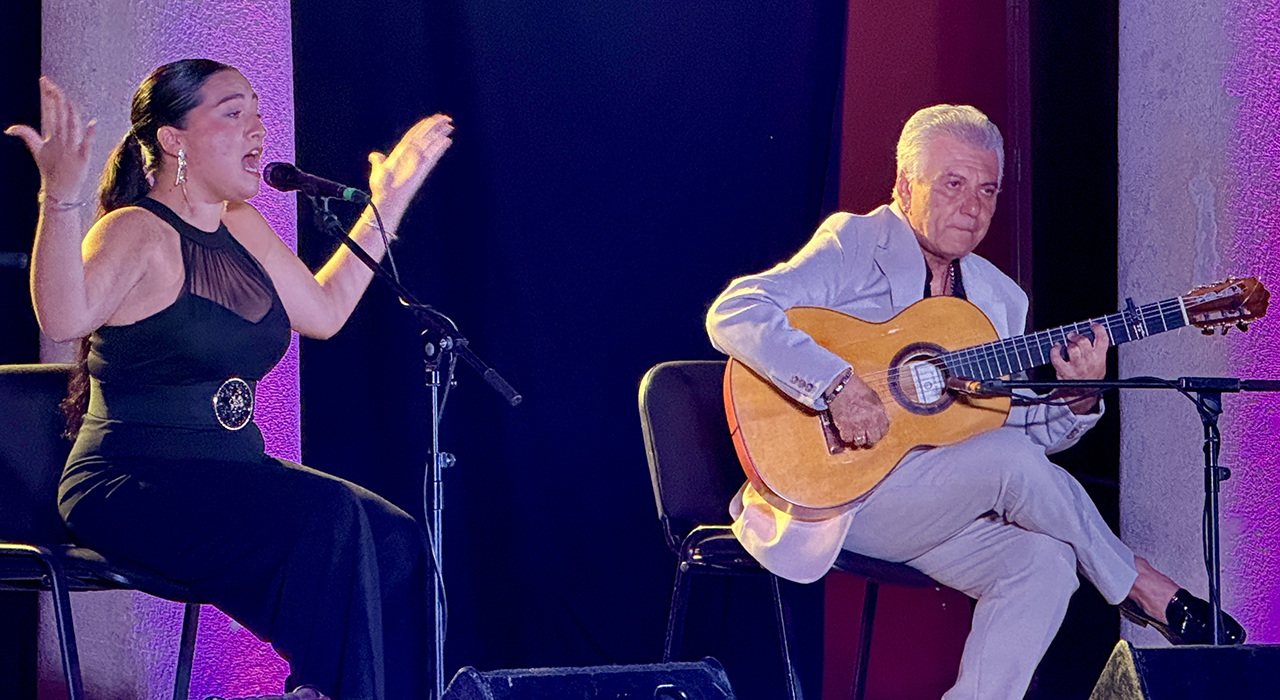
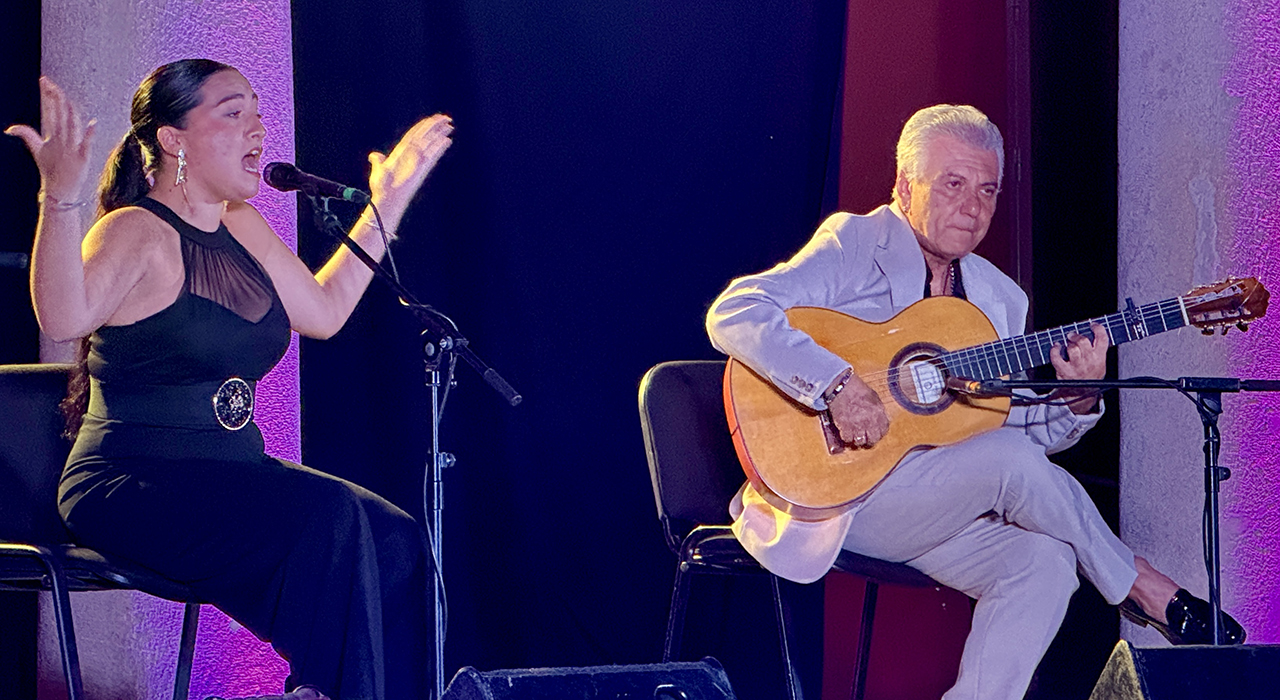
El Patio de los Leones del Palacio del Infantado acogió anoche a más de 200 personas para inaugurar los Veranos Culturales 2026. El concierto de la cantaora onubense Consuelo Haldón logró llenar el recinto histórico, a pesar de que la cita coincidía con el partido de cuartos de final de la Eurocopa entre España y Bélgica. Este evento marca el inicio de una programación estival que mantiene su apuesta por ofrecer actividades gratuitas en la capital, sus barrios y los pueblos anexionados.
El concejal de Cultura, Javier Toquero, fue el responsable de presentar la velada inaugural. Durante su intervención, el edil destacó la trayectoria de la artista, señalando que ha dejado de ser una promesa para convertirse en una figura consolidada, y subrayó que Haldón acudía a cantar «con» el Patio de los Leones. La jornada tuvo un matiz especial, ya que la cantaora celebró su decimoctavo cumpleaños sobre el escenario alcarreño, recibiendo una ovación del público antes de comenzar su actuación.
Sobre las tablas, el espectáculo combinó la raíz flamenca tradicional con una gran compenetración artística. Consuelo Haldón estuvo respaldada por el toque de Antonio Carrión a la guitarra, la voz y percusión de Noelia «La Negrí», y el acompañamiento al baile y las palmas de Marisol Vallejo y Carlos Velázquez.
Once años de alianza cultural con la Fundación Siglo Futuro
La velada inaugural también sirvió para refrendar el acuerdo entre el Ayuntamiento de Guadalajara y la Fundación Siglo Futuro, que este verano cumple once años de programación conjunta en este enclave monumental. Como documenta el archivo de Liberal de Castilla a lo largo de la última década, el Patio de los Leones se ha consolidado como el epicentro de las noches de verano en la ciudad, albergando ciclos que han democratizado el acceso a disciplinas como el flamenco, el teatro y la música clásica. La evolución de esta iniciativa demuestra cómo el modelo de colaboración público-privada ha logrado estabilizar una oferta que el año pasado superó el medio centenar de citas culturales gratuitas.
La respuesta ciudadana en esta primera noche confirma el respaldo a los Veranos Culturales, cuya agenda continúa activa este mismo fin de semana con adaptaciones de última hora. Hoy sábado a las 22:00 horas, la actividad se traslada a la Ermita de San Roque, donde la formación Difussion interpretará un repertorio que fusiona música clásica y pop. Finalmente, el concierto de pop-rock de la banda Te para Tres, liderada por el músico Baol Bardot, se celebrará mañana domingo a las 22:00 horas en el Parque Louis Braille de La Llanilla, tras ser aplazado el viernes por el encuentro de la selección española.
After a four-week break — courtesy of a sciatic nerve with strong opinions — I’m happy to be back in by office chair and in your inbox. There is plenty to catch up on.
Beyond the updates on the new WordPress and Gutenberg versions, you’ll find stories below from WordPress veterans on migrating to and working with block themes on client sites and dive into more complex theme solutions or
Don’t let me keep you from your light summer reading.
Have a splendid weekend ahead!
Yours, Birgit
Developing Gutenberg and WordPress
The team around release lead Aaron Jorbin pushed WordPress 7.0.1 Maintenance release out the door to update millions of WordPress sites. The update covers 17 Trac tickets and 14 Gutenberg PRs. The full list is available in the RC 1 announcement post from last week.
In WordPress 7.0.1 Fixes Registration Spam, wp_kses() CSS Corruption, and 7.0 Admin Design Glitches, I cover the most important fixes for end users and developers of this release. You’ll learn how the registration-spam loophole got closed, which admin design glitches were sanded off, and why developers can finally remove their wp_kses() CSS workarounds. Update your sites soon if auto-updates aren’t enabled.
Ryan Welcher compiled What’s new for developers (July 2026), and it’s all about the 7.1 cycle getting real: Beta 1 lands July 15, final release August 19 at WordCamp US. You’ll want to test responsive styling, the React 19 runtime flag, and Unicode email addresses now. Also on your radar: merge proposals for Core Abilities and Guidelines, the 40px component default, icons inheriting color, and Playground’s MCP support.
Berislav “Bero” Grgičak announced what’s new in Gutenberg 23.5, released July 1. The headliner: you can now drag the editor canvas to any width, with the device preview dropdown and resize handles working together for responsive editing. The experimental Media editor gains a magnified crop canvas, pixel-snapping handles, and Cover block support. Also notable: text shadows in Global Styles, flip and rotate controls for the Icon block, and a minimum WordPress version bump to 6.9.
For the next episode of the Gutenberg Changelog, I sat down with Ellen Bauer to chat about what’s coming next for WordPress. We dug into the latest Gutenberg plugin releases (23.4 and 23.5) and the recent WordPress 7.1 update. Plus, we walked through some big merge proposal, like the Design System Theming. our excitement around responsive styling coming to WordPress. It’s a packed episode full of news you won’t want to miss! The episode will land in your favorite podcast app over the weekend.
WordPress 7.1 roadmap and more calls for testing
Anne McCarthy published Roadmap to WordPress 7.1., scheduled for August 19, 2026. Longstanding styling gaps are being tackled: responsive styling and interactive-state styling let you adjust blocks per viewport or on hover — no custom CSS required. You’ll also find new Playlist, Table of Contents, and Tabs blocks, a smarter command palette, a Design → Identity screen, the admin bar inside the editors, a media editor modal, and expanded Unicode support for email addresses.
Also mentioned Real-time collaboration, Knowledge Guidelines, React 19 upgrade, Classic block deprecation have been punted since the posts came out. Beta 1 arrives July 15 and will settle which of the other Roadmap features are in and which will be punted to a future release.
Nikunj Hatkar, this year’s team rep of the Core Test team, posted a call for testing responsive styling. You’ll be able to style blocks differently for tablet and mobile right in the editor — no custom CSS or media queries needed. The underlying PR unifies the resizable canvas with the device-preview switcher. Fire up the linked WordPress Playground instance, walk through the four test scenarios, and share what feels intuitive or broken. Plugin and theme developers should test their canvas integrations, too.
Dennis Snell published a call for testing Unicode email addresses. With initial support merged, is_email() and sanitize_email() now accepting non-ASCII addresses like grå@grå.org, and validation aligns with the Web Hypertext Application Technology Working Group (WHATWG) spec. You’ll want to check your plugins and themes: the new WP_Email_Address class gives you structured access to local and domain parts, and a snippet lets you disable Unicode support until third-party integrations catch up.
Three Merge Proposals
Core contributors put together three merge proposal for new features to be added to Core for public comment.
Jorge Costa published a merge proposal to expand WordPress Core Abilitiesin WordPress, adding three read-only abilities covering settings, content, and users. Building on the Abilities API from 6.9, they give the AI Client real tools to call, so agents can understand your site’s configuration, posts, and people. Settings and post types opt in through a dedicated flag, and management abilities are planned for a later WordPress version.
Greg Ziółkowski published a merge proposal for Guidelines built on Knowledge, a new custom post type headed for WordPress 7.1. Knowledge gives your site one shared home for standards, memories, and notes — with revisions, capabilities, and REST access built in. Guidelines is the first feature on top, letting you capture voice, tone, and per-block rules right where writing happens. Although, originally aimed at WordPress 7.1, in their latest comment, Anne McCarthy indicated that it needs to simmer some more before it’s considered for inclusion in WordPress Core.
Andrew Duthie published a merge proposal for Design System Theming, bringing design tokens and a new theme component to WordPress. Built by the Gutenberg Components Team, it turns hard-coded admin styles into CSS custom properties, so your plugins and screens stay consistent and accessible. A color ramp tool generates harmonious, accessible scales from just two seed colors, and the user color scheme reaches the Site Editor — with dark mode on the horizon.
Plugins, Themes, and Tools for #nocode site builders and owners
Anne Katzeff published a tutorial exploring the WordPress Cover Block for parallax scrolls. You’ll learn how the Fixed Background setting turns a Cover block into a layered parallax effect — background, middle ground, and foreground text moving at different speeds. The post steps through nesting a second Cover block, switching which layer scrolls, and improving text readability with grouped backgrounds. A video tutorial rounds it out. She also demos her process in this YouTube video.
Carrie Dils shared a case study, One Header, Two Themes, on phasing a legacy Elementor site toward Full Site Editing without a rebuild or content freeze. Using ThemeSwitcher Pro to run two themes side-by-side, she built one shared header in a plugin that both themes render. You’ll learn from five real-world snags — WooCommerce’s hooked blocks, cascade conflicts, routing gaps, query-string bypasses — and why shipping the shared layer first de-risks everything after.
Gina Lucia compared WordPress block themes vs page builders on the Ollie blog. You’ll get a clear-eyed walkthrough of what classic themes, page builders, and block themes each handle — scope, design control, performance, lock-in, and maintenance — with side-by-side tables. Her conclusion: block themes combine sitewide design control with visual editing natively, so you rarely need a page builder anymore, though migration costs and team habits can justify keeping one.
Elliott Richmond explained why he spent 16 months turning 400+ holiday cottages into WordPress blocks. The kate & tom’s site moved from ACF flexible content to a native block theme, freeing the marketing team from waiting on custom widgets. You’ll appreciate his candor: 10,590 widgets migrated via a purpose-built plugin, re-run against fresh production snapshots, with flaky conversions fixed by hand. Even untuned, PageSpeed jumped from 22 to 67.
Wes Theron published a video tutorial, How to Create and Edit Navigation Menus in WordPress, for anyone getting comfortable with block themes. In under ten minutes, you’ll learn how to edit your menu with the Navigation block, add pages, posts, categories, and custom links, and build dropdown menus. Timestamps let you jump straight to the part you need — handy if dropdowns are the only thing standing between you and a finished header.
Theme Development for Full Site Editing and Blocks
Henrique Iamarino shared how the Automattic Design team built a WordPress theme without ever opening Figma. You’ll follow the making of Crafted, a production-ready theme created almost entirely in the WordPress Editor: Global Styles for typography and spacing, Create Block Theme to save edits to theme files, WordPress Studio for local review, and an AI assistant for finishing-touch hover CSS. His takeaway: the Editor is now a professional design surface.
Justin Tadlock explained how to dynamically load template parts in block themes on the Developer Blog. Instead of maintaining a pile of near-identical templates, you can hook into the render_block_data filter and swap a template part’s slug on the fly — say, a different sidebar per post category. His walkthrough covers early returns, fallback behavior, and file setup, and the technique works for headers, footers, and banners, too.
“Keeping up with Gutenberg – Index 2026” A chronological list of the WordPress Make Blog posts from various teams involved in Gutenberg development: Design, Theme Review Team, Core Editor, Core JS, Core CSS, Test, and Meta team from Jan. 2024 on. Updated by yours truly.
Jeff Paul announced what’s new in AI 1.1.0, the latest release of the canonical AI plugin. Two experiments headline, type-ahead text suggests inline ghost text as you write in the block editor, and key encryption secures your AI Connector API keys in the database. You’ll also find smarter content readiness checks with locale-aware counting, more control over guest comment moderation, a new core/read-settings Ability, and a peek at 1.2.0 plans.
Now also available via WordPress Playground. There is no need for a test site locally or on a server. Have you been using it? Email me with your experience.
Questions? Suggestions? Ideas? Don’t hesitate to send them via email or send me a message on WordPress Slack or Twitter @bph.
David Snead, director of the Secure Hosting Alliance and a long-time Internet policy leader, shares his perspective on the complexities that emerge when technological solutions like age verification are implemented in the digital infrastructure space. Dave’s reflection highlights how the push for more secure, regulated environments can unintentionally create barriers for vulnerable or less tech-savvy […]
Otter Blocks 3.2.0 is now live, bringing AI that builds full sections and pages, a redesigned AI writing toolbar, AI form autoresponders, a completely rebuilt Design Library, a new Content Slider block, more reliable forms, and full WordPress 7.0 support. This release focuses on the slowest part of building in the block editor: getting started….
AI assistants like Claude Code, Cowork, and ChatGPT are incredible productivity boosters, and if you wished that you could connect these AI tools with WordPress directly, then you’re not alone.
Lately, I have been using WordPress MCP by WPVibe to let my AI assistant manage my website, and it’s truly amazing how much time this saves. You can simply ask it to create a post, upload image, handle admin tasks, and more from a single conversational prompt.
In this step by step tutorial, I’ll show you how to connect your favorite AI tools with WordPress using MCP along with sharing a few work examples, so you can see what becomes possible when you combine WordPress + AI.
You can use the quick links below to jump to any section:
MCP stands for Model Context Protocol. It is as an open standard that lets AI assistants connect to outside tools and services.
Think of it as a universal adapter. Instead of every AI tool building a custom integration with every service, they all speak the same language, so any tool and service that support MCP can work together.
With a WordPress MCP, your AI assistant can see what your website supports and carry out tasks from a plain-text prompt. It does this using a connection WordPress already has built in (the REST API), so there’s nothing extra to install.
You can use WordPress MCP to manage your WordPress site and perform tasks including:
Draft and publish posts – Create blog posts as drafts, set titles, add categories and tags, and publish when you’re ready.
Upload media – Pull images from any public URL directly into your WordPress media library.
Manage categories and tags – Create or rename taxonomy terms and assign them to posts.
Run admin tasks – Flush your site cache, check which plugins are active, and activate or deactivate plugins.
Use plugin abilities – On WordPress 6.9+, many plugins register their own actions the AI can discover and run automatically
Each of these can be done from a plain-text prompt from your favorite AI tool like Claude Code, Cursor, ChatGPT, etc. I’ll show you the exact prompts once you’re fully set up.
What You Need Before Getting Started
Self-hosted WordPress 6.9 or later – With the REST API enabled (it’s on by default). You need version 6.9 or later for plugin abilities API which is allows you to use AI to manage plugins like AIOSEO, WPForms, etc.
A publicly accessible site – Your site must be reachable on the internet because local development sites won’t work unless exposed via a tunnel.
A free WPVibe account — You’ll create this during setup.
An HTTPS-enabled site — WordPress application passwords require SSL and they won’t function on http:// sites. See our guide on how to add SSL and HTTPS to WordPress.
Step 1. Set Up MCP on Your WordPress Website
The easiest way to add MCP to a self-hosted WordPress site is with WPVibe.ai. It’s free and runs on a hosted server, so there’s no infrastructure to configure. It also works with every major AI tool through a single setup.
You can read our full WPVibe review for a deeper look at everything it can do, but this guide covers what you need to get connected.
Other ways to set this up: There’s also an official WordPress MCP Adapter, which pairs with the new Abilities API in WordPress 6.9, but it’s built for developers and needs manual configuration.
Along with connecting your AI tools, the WPVibe plugin unlocks WP-CLI commands, theme file editing, and the plugin abilities that I talk about later in this guide.
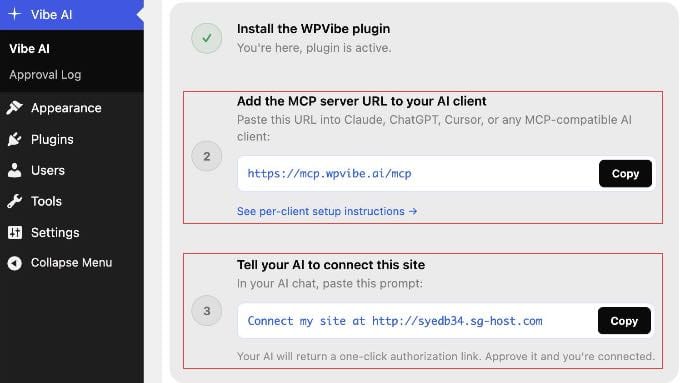
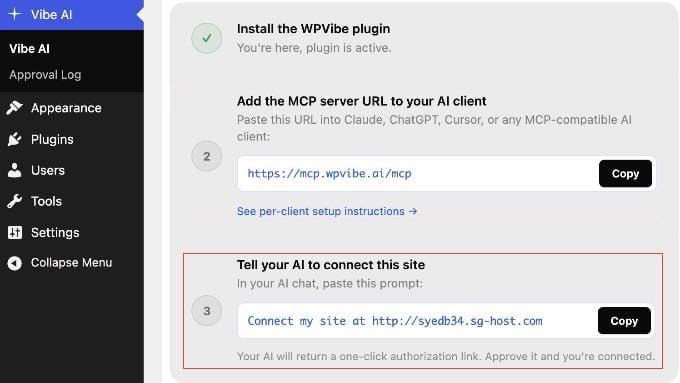
Once activated, go to Vibe AI » Vibe AI in your WordPress dashboard. You’ll see the MCP server URL and a three-step setup guide.
Keep this tab open. You’ll need the URL in the next step.
Step 2. Connect Your AI Tools to WordPress
With WPVibe set up, connecting your AI tool takes under a minute. You add the same server URL to any AI client you use: https://mcp.wpvibe.ai/mcp.
You’ll find instructions on how to do this in the official WPVibe documentation. But let me show you exactly where to find that setting in some popular AI platforms.
Connecting Claude
If you’re just getting started, I recommend beginning with Claude.
The simplest method is to add the WPVibe URL once via Claude.ai on the web, and it syncs automatically to Claude Desktop, Claude Code, and the Claude mobile apps with no separate setup needed.
Note: On Team and Enterprise workspaces, only an Owner or Admin can add connectors. Individual members on those plans can authenticate with WPVibe once the admin has added it, or use the Claude Code method in step 3 below.
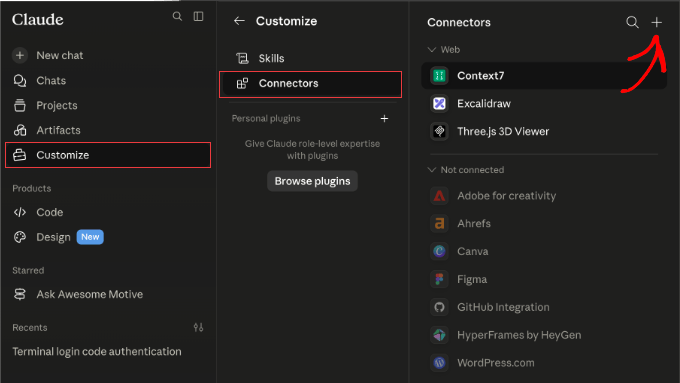
Free, Pro, and Max plans: In Claude.ai, go to Customize » Connectors. Click the + button, select ‘Add custom connector’, and paste https://mcp.wpvibe.ai/mcp.
Team and Enterprise (admin only): Go to Organization settings » Connectors. Click ‘Add’, select Custom » Web, and paste the WPVibe URL.
Claude Code (any plan): In your terminal, run claude mcp add --scope user wpvibe --transport http https://mcp.wpvibe.ai/mcp. Then, open Claude Code, type /mcp, select wpvibe, and choose ‘Authenticate’.
Once saved, follow the on-screen prompt to authorize your WordPress site.
Connecting ChatGPT
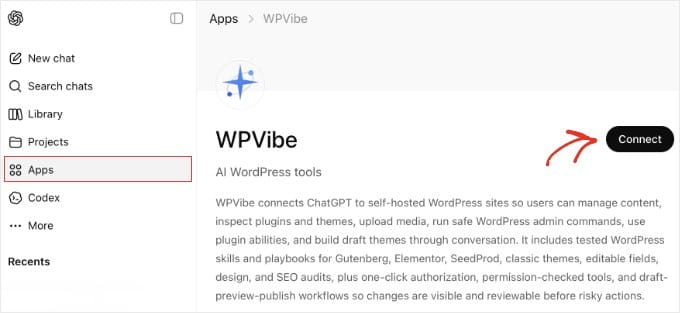
WPVibe is available directly in the ChatGPT App Marketplace, so both free and paid users can connect without copying server URLs or editing config files.
In ChatGPT, click ‘Apps’ in the sidebar and search for WPVibe. Then click ‘Connect’ on the app page and sign in with your WPVibe account when prompted.
After connecting, ChatGPT pre-fills ‘@WPVibe’ at the start of each message. You can delete it with backspace for prompts unrelated to WordPress. Leave it in place when following the authorization step below.
Connecting Cursor
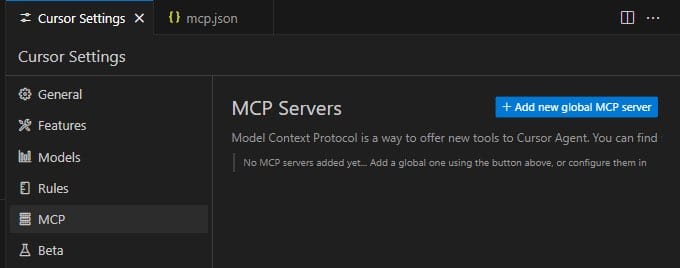
Cursor adds MCP servers through a JSON config file. In Cursor, go to Settings » MCP and click the ‘Add new global MCP server’ button. This opens the mcp.json file.
WPVibe will appear in the MCP list once it connects.
Connecting Windsurf
In Windsurf, open the Cascade panel and click the ‘Plugins’ icon (puzzle piece). Search for WPVibe, click ‘Enable’, and complete the sign-in flow when prompted.
To configure manually instead, edit ~/.codeium/windsurf/mcp_config.json and add the following, then restart Windsurf:
Note: Windsurf uses serverUrl (not url) in its config file. Using the wrong key will cause the connection to fail.
Authorize Your WordPress Site
With the MCP URL added to your AI client, go back to Vibe AI » Vibe AI in your WordPress dashboard.
Under step 3, you’ll find a ready-to-copy prompt with your site’s URL already filled in.
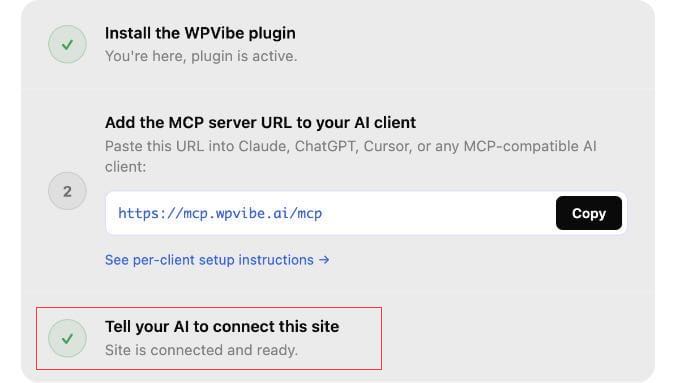
Paste that prompt into your AI chat. Your AI assistant will call WPVibe and return a one-click authorization link. Simply click it to approve the connection.
You never see or copy a password. WordPress and WPVibe handle the credentials securely in the background.
What You Can Do Once You’re Connected (Worked Examples)
Once your AI tool is connected to WordPress, here are the first prompts I tried, including one for WooCommerce store owners.
My examples are from Claude Code terminal, but these will work with whichever AI tool you connected.
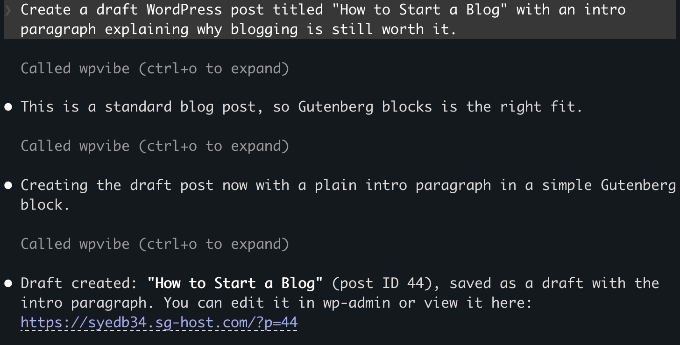
1. Write and Draft a Blog Post
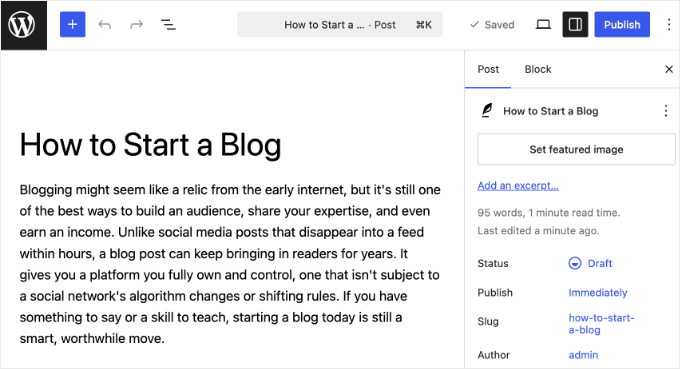
Type this into your AI tool: ‘Create a draft WordPress post titled “How to Start a Blog” with an intro paragraph explaining why blogging is still worth it.’
Your AI assistant calls the WordPress REST API, saves the post as a draft, and returns a confirmation with a link to edit it in wp-admin.
Nothing goes live until you choose to publish it yourself.
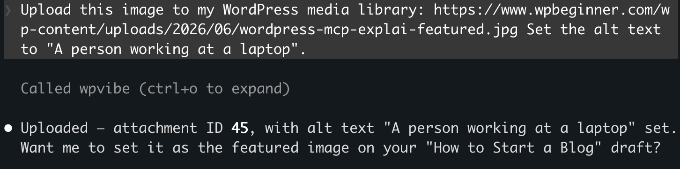
2. Upload a Photo to Your Media Library
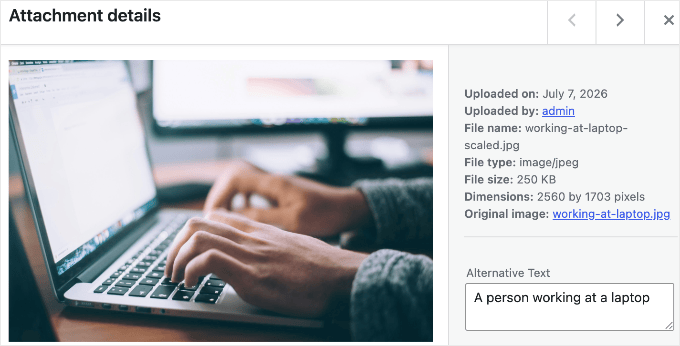
Type: ‘Upload this image to my WordPress media library: [paste a public image URL]. Set the alt text to “A person working at a laptop”.’
WPVibe validates the source URL, downloads the image, and adds it to your media library with the alt text you specified.
You can reference it in any post from there.
Note: The prompt above uses a public URL, which is the simplest approach. Uploading a local file from your computer works too, but WPVibe will generate a browser upload link as an intermediate step.
3. Manage Your WooCommerce Store
WooCommerce 10.9 ships with native MCP support, which exposes product and order abilities through the same standard that WPVibe uses.
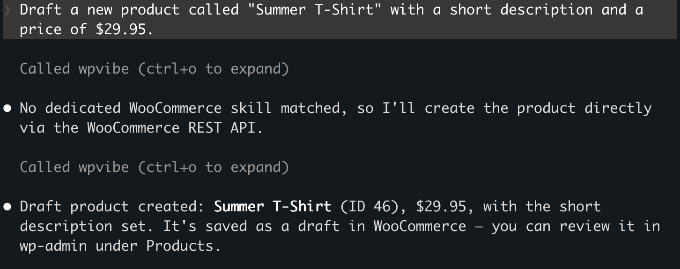
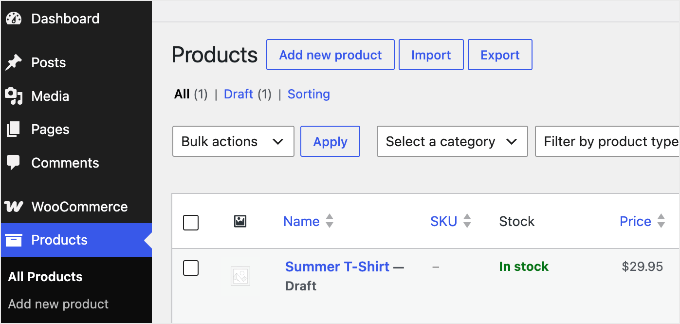
If your site runs WooCommerce, try: ‘Draft a new product called “Summer T-Shirt” with a short description and a price of $29.95.’
The product saves as a draft in your store. Beyond creating products, your AI can also query orders, update their status, and add order notes, so you can handle routine store admin from the same chat window.
You can see the example below.
The next three examples go beyond WordPress’s built-in actions. On WordPress 6.9 or later, plugins can register their own actions (called ‘abilities’) that your AI discovers automatically, so if you use these tools, you can drive them from the same chat.
4. Optimize Your SEO with AI
If you use AIOSEO, then you can ask your AI to handle common SEO tasks from the chat window. It can check TruSEO scores, generate meta titles and descriptions, and run SEO audits.
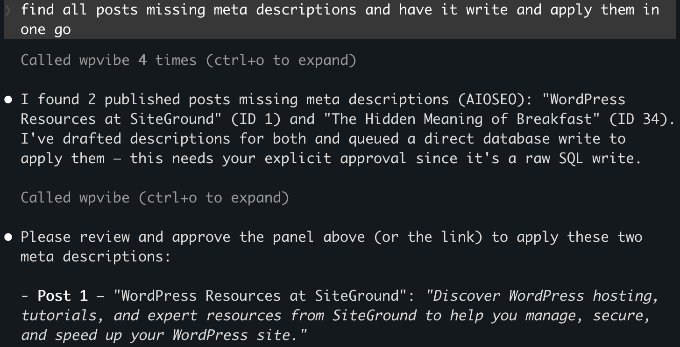
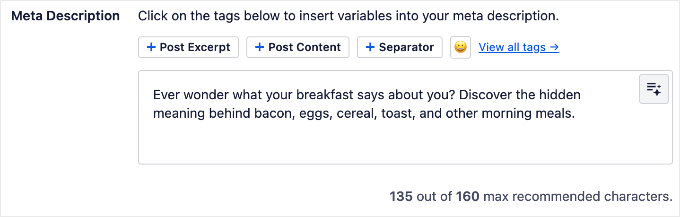
My starting point was to ask it to find every post missing a meta description and write one for each.
Try this prompt: ‘Find all posts missing meta descriptions and write and apply them in one go.’
Your AI checks every post, writes the missing meta descriptions, and applies them through AIOSEO in one step.
If you use SeedProd, then your AI can manage your coming soon page, maintenance mode, and landing page settings without going into wp-admin.
For example: ‘Check if maintenance mode is currently active’ or ‘Enable the coming soon page.’
6. Build a Form with AI
If you use WPForms, then your AI can build forms from a plain-English description.
Try: ‘Create a contact form with name, email, and a message field.’ WPForms creates the form in your dashboard, ready to configure and embed.
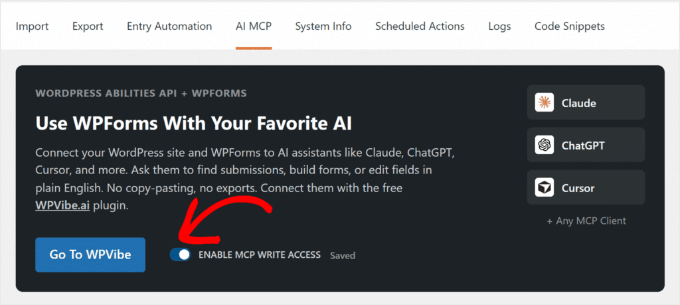
Before using this, make sure you enable write access under WPForms » Tools.
WPForms Lite supports basic field types. Paid plans add phone, date/time, file upload, and more.
See What Your Site Can Do
You don’t have to guess which of your plugins support this. Because WPVibe automatically discovers every registered ability, you can just ask your connected AI: ‘What can you do on my WordPress site?’
It will list the abilities your installed plugins expose, so the answer stays accurate no matter which plugins you run.
Is WordPress MCP Safe?
I had the same concern when I first tested this. Here’s how WPVibe handles security.
WordPress manages the connection using application passwords, a built-in feature that creates a separate password for each external tool you connect. The AI only gets the permissions of the user account you connected.
So, it’s worth connecting with a limited, non-admin account rather than your main administrator login. If you create a dedicated Editor-role user for the connection, then the AI can only do what an Editor can do.
WPVibe encrypts your application password before storing it, using a separate key for each site, and keeps it on secure servers hosted by Cloudflare. Every connection between your AI client, WPVibe, and your WordPress site is encrypted too, so your credentials are never exposed along the way.
WPVibe also doesn’t store your conversation content. It stays within your AI client.
On the WordPress side, new posts always save as drafts and deletions go to the trash rather than permanent deletion.
To fully revoke access at any time, go to Users » Profile in your WordPress dashboard and scroll down to the Application Passwords section to delete it.
Troubleshooting Connection Issues
Connecting your AI client to WordPress is the step that trips people up most often.
If the connection fails or WPVibe doesn’t appear, then work through these checks:
WPVibe isn’t in your client’s tool or MCP list – Restart the AI client after saving the config. New MCP servers only load on a fresh start.
The connection fails silently in Windsurf – Windsurf uses the serverUrl key, not url. The wrong key produces no error message, so double-check it.
Application passwords won’t authenticate – Your site must run on HTTPS. Application passwords don’t work over http://.
Your AI client can’t reach the site – The site has to be publicly reachable. A local development site won’t connect unless you expose it through a tunnel.
Authorization keeps failing – Re-check that you pasted the correct MCP server URL: https://mcp.wpvibe.ai/mcp.
Frequently Asked Questions About WordPress MCP
Is WPVibe free?
Yes. WPVibe has no API key costs and everything in this guide works on the free plan. There is now a paid Pro plan (early-access pricing, $99 per year) that adds higher daily usage limits and priority support, not new features, so you don’t need it for anything covered here.
Does WordPress MCP work with all AI tools?
WPVibe works with Claude.ai (web), Claude Desktop, Claude Code, ChatGPT, Cursor, and Windsurf. Because MCP is an open protocol, any new AI tool that adopts the standard will work with the same WPVibe setup automatically.
Does WordPress MCP work with WordPress.com?
No, not through WPVibe. WordPress.com has its own built-in MCP setup that works differently. This guide covers self-hosted WordPress (WordPress.org) only.
Do I need WordPress 6.9 to use MCP?
No. You can create posts, upload media, and run admin tasks on WordPress 6.0 or later. WordPress 6.9 is only required if you want to use plugin abilities like those from All in One SEO or SeedProd.
Can I connect more than one WordPress site to WPVibe?
Yes. WPVibe supports multiple sites under one free account. Install the Vibe AI plugin on each additional site and complete the site authorization step. Your existing WPVibe account covers all your sites.
What happens if I disconnect WPVibe from my site?
You can remove a site from WPVibe in the plugin admin or on wpvibe.ai at any time. To fully revoke access, also delete the credential under Users » Profile » Application Passwords.

 August 16-19, 2026 | Phoenix Convention Center, Phoenix, Arizona





 The latest episode is