David Snead, director of the Secure Hosting Alliance and a long-time Internet policy leader, shares his perspective on the complexities that emerge when technological solutions like age verification are implemented in the digital infrastructure space. Dave’s reflection highlights how the push for more secure, regulated environments can unintentionally create barriers for vulnerable or less tech-savvy […]
Author: Gerardo Medina
-
Otter Blocks 3.2.0: AI Page Building and a New Design Library
Otter Blocks 3.2.0 is now live, bringing AI that builds full sections and pages, a redesigned AI writing toolbar, AI form autoresponders, a completely rebuilt Design Library, a new Content Slider block, more reliable forms, and full WordPress 7.0 support. This release focuses on the slowest part of building in the block editor: getting started….
The post Otter Blocks 3.2.0: AI Page Building and a New Design Library appeared first on Themeisle Blog.
-
How to Connect AI Agents With WordPress using MCP (Step by Step)
AI assistants like Claude Code, Cowork, and ChatGPT are incredible productivity boosters, and if you wished that you could connect these AI tools with WordPress directly, then you’re not alone.
Lately, I have been using WordPress MCP by WPVibe to let my AI assistant manage my website, and it’s truly amazing how much time this saves. You can simply ask it to create a post, upload image, handle admin tasks, and more from a single conversational prompt.
In this step by step tutorial, I’ll show you how to connect your favorite AI tools with WordPress using MCP along with sharing a few work examples, so you can see what becomes possible when you combine WordPress + AI.
You can use the quick links below to jump to any section:
- What is a WordPress MCP and What Can It Do?
- What You Need Before Getting Started
- Step 1. Set Up MCP on Your WordPress Website
- Step 2. Connect Your AI Tools to WordPress
- What You Can Do Once You’re Connected (Worked Examples)
- Is WordPress MCP Safe?
- Troubleshooting Connection Issues
- Frequently Asked Questions About WordPress MCP
What is a WordPress MCP and What Can It Do?
MCP stands for Model Context Protocol. It is as an open standard that lets AI assistants connect to outside tools and services.
Think of it as a universal adapter. Instead of every AI tool building a custom integration with every service, they all speak the same language, so any tool and service that support MCP can work together.
With a WordPress MCP, your AI assistant can see what your website supports and carry out tasks from a plain-text prompt. It does this using a connection WordPress already has built in (the REST API), so there’s nothing extra to install.
You can use WordPress MCP to manage your WordPress site and perform tasks including:
- Draft and publish posts – Create blog posts as drafts, set titles, add categories and tags, and publish when you’re ready.
- Upload media – Pull images from any public URL directly into your WordPress media library.
- Manage categories and tags – Create or rename taxonomy terms and assign them to posts.
- Run admin tasks – Flush your site cache, check which plugins are active, and activate or deactivate plugins.
- Use plugin abilities – On WordPress 6.9+, many plugins register their own actions the AI can discover and run automatically
Each of these can be done from a plain-text prompt from your favorite AI tool like Claude Code, Cursor, ChatGPT, etc. I’ll show you the exact prompts once you’re fully set up.
What You Need Before Getting Started
- Self-hosted WordPress 6.9 or later – With the REST API enabled (it’s on by default). You need version 6.9 or later for plugin abilities API which is allows you to use AI to manage plugins like AIOSEO, WPForms, etc.
- A publicly accessible site – Your site must be reachable on the internet because local development sites won’t work unless exposed via a tunnel.
- A free WPVibe account — You’ll create this during setup.
- An HTTPS-enabled site — WordPress application passwords require SSL and they won’t function on
http://sites. See our guide on how to add SSL and HTTPS to WordPress.
Step 1. Set Up MCP on Your WordPress Website
The easiest way to add MCP to a self-hosted WordPress site is with WPVibe.ai. It’s free and runs on a hosted server, so there’s no infrastructure to configure. It also works with every major AI tool through a single setup.
You can read our full WPVibe review for a deeper look at everything it can do, but this guide covers what you need to get connected.
Other ways to set this up: There’s also an official WordPress MCP Adapter, which pairs with the new Abilities API in WordPress 6.9, but it’s built for developers and needs manual configuration.
Install and Activate the Vibe AI Plugin
First, you will need to install and activate the free WPVibe plugin. If you need any help, our guide on how to install a WordPress plugin covers each step.
Along with connecting your AI tools, the WPVibe plugin unlocks WP-CLI commands, theme file editing, and the plugin abilities that I talk about later in this guide.
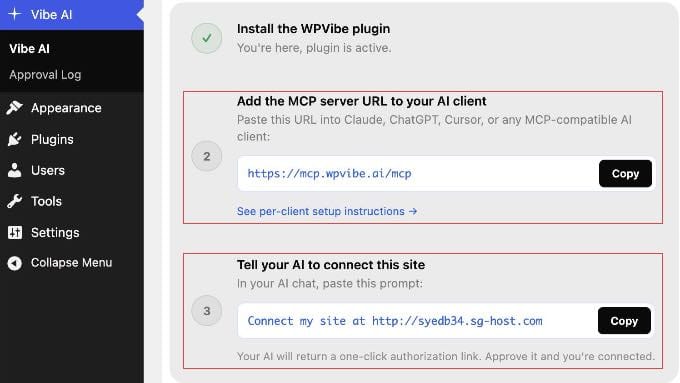
Once activated, go to Vibe AI » Vibe AI in your WordPress dashboard. You’ll see the MCP server URL and a three-step setup guide.
Keep this tab open. You’ll need the URL in the next step.
Step 2. Connect Your AI Tools to WordPress
With WPVibe set up, connecting your AI tool takes under a minute. You add the same server URL to any AI client you use:
https://mcp.wpvibe.ai/mcp.You’ll find instructions on how to do this in the official WPVibe documentation. But let me show you exactly where to find that setting in some popular AI platforms.
Connecting Claude
If you’re just getting started, I recommend beginning with Claude.
The simplest method is to add the WPVibe URL once via Claude.ai on the web, and it syncs automatically to Claude Desktop, Claude Code, and the Claude mobile apps with no separate setup needed.
Note: On Team and Enterprise workspaces, only an Owner or Admin can add connectors. Individual members on those plans can authenticate with WPVibe once the admin has added it, or use the Claude Code method in step 3 below.
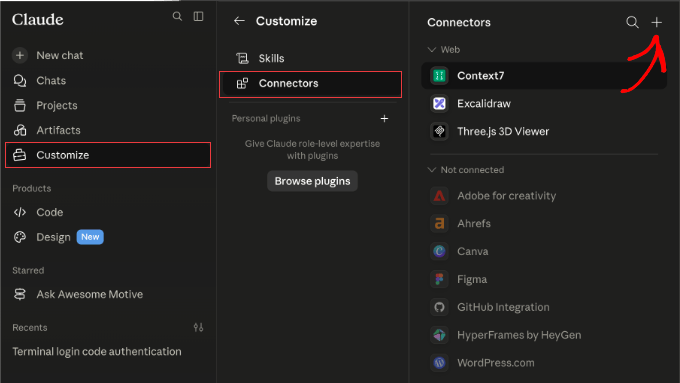
- Free, Pro, and Max plans: In Claude.ai, go to Customize » Connectors. Click the + button, select ‘Add custom connector’, and paste
https://mcp.wpvibe.ai/mcp. - Team and Enterprise (admin only): Go to Organization settings » Connectors. Click ‘Add’, select Custom » Web, and paste the WPVibe URL.
- Claude Code (any plan): In your terminal, run
claude mcp add --scope user wpvibe --transport http https://mcp.wpvibe.ai/mcp. Then, open Claude Code, type/mcp, select wpvibe, and choose ‘Authenticate’.
Once saved, follow the on-screen prompt to authorize your WordPress site.
Connecting ChatGPT
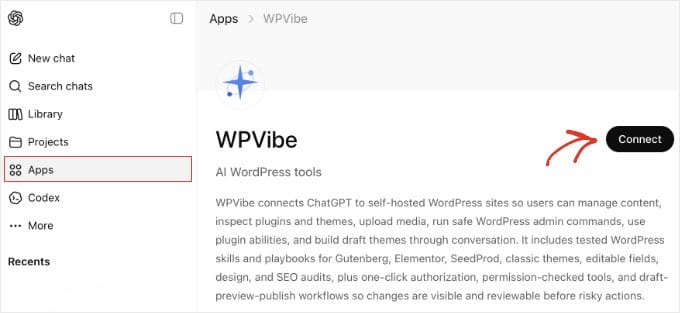
WPVibe is available directly in the ChatGPT App Marketplace, so both free and paid users can connect without copying server URLs or editing config files.
In ChatGPT, click ‘Apps’ in the sidebar and search for WPVibe. Then click ‘Connect’ on the app page and sign in with your WPVibe account when prompted.
After connecting, ChatGPT pre-fills ‘@WPVibe’ at the start of each message. You can delete it with backspace for prompts unrelated to WordPress. Leave it in place when following the authorization step below.
Connecting Cursor
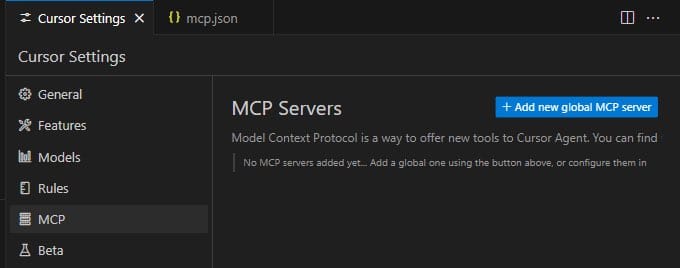
Cursor adds MCP servers through a JSON config file. In Cursor, go to Settings » MCP and click the ‘Add new global MCP server’ button. This opens the
mcp.jsonfile.Add the following entry and save:
{ "mcpServers": { "wpvibe": { "url": "https://mcp.wpvibe.ai/mcp" } } }Make sure you restart Cursor after saving.
WPVibe will appear in the MCP list once it connects.
Connecting Windsurf
In Windsurf, open the Cascade panel and click the ‘Plugins’ icon (puzzle piece). Search for WPVibe, click ‘Enable’, and complete the sign-in flow when prompted.
To configure manually instead, edit
~/.codeium/windsurf/mcp_config.jsonand add the following, then restart Windsurf:{ "mcpServers": { "wpvibe": { "serverUrl": "https://mcp.wpvibe.ai/mcp" } } }Note: Windsurf uses
serverUrl(noturl) in its config file. Using the wrong key will cause the connection to fail.Authorize Your WordPress Site
With the MCP URL added to your AI client, go back to Vibe AI » Vibe AI in your WordPress dashboard.
Under step 3, you’ll find a ready-to-copy prompt with your site’s URL already filled in.
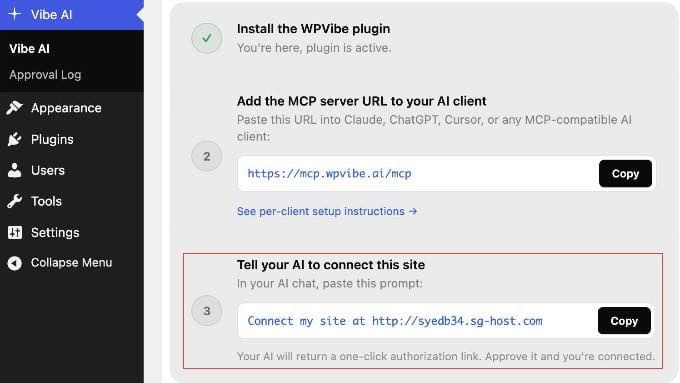
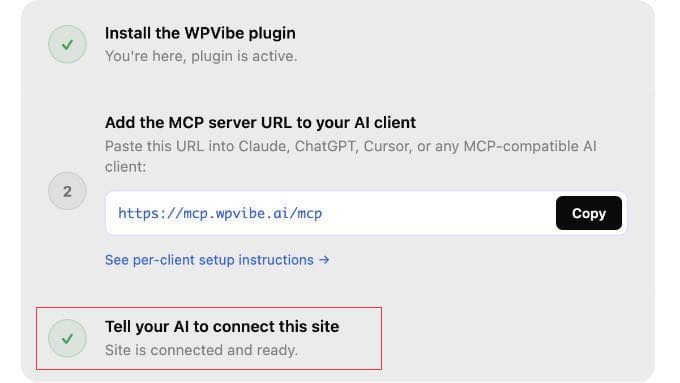
Paste that prompt into your AI chat. Your AI assistant will call WPVibe and return a one-click authorization link. Simply click it to approve the connection.
You never see or copy a password. WordPress and WPVibe handle the credentials securely in the background.
What You Can Do Once You’re Connected (Worked Examples)
Once your AI tool is connected to WordPress, here are the first prompts I tried, including one for WooCommerce store owners.
My examples are from Claude Code terminal, but these will work with whichever AI tool you connected.
1. Write and Draft a Blog Post
Type this into your AI tool: ‘Create a draft WordPress post titled “How to Start a Blog” with an intro paragraph explaining why blogging is still worth it.’
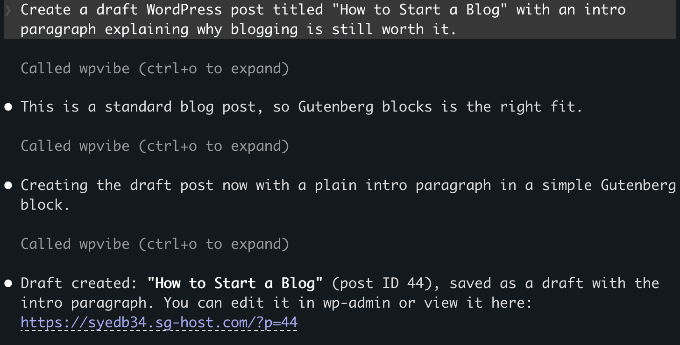
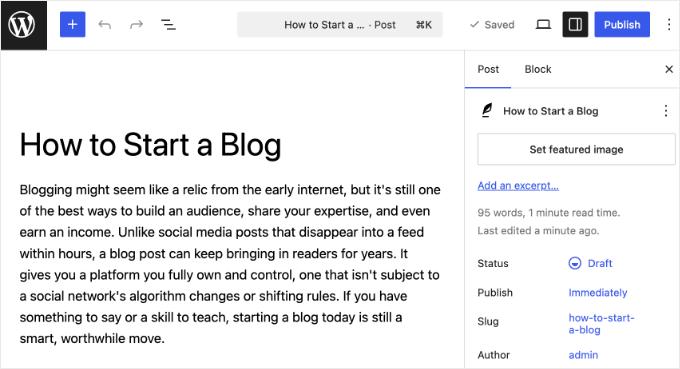
Your AI assistant calls the WordPress REST API, saves the post as a draft, and returns a confirmation with a link to edit it in wp-admin.
Nothing goes live until you choose to publish it yourself.
2. Upload a Photo to Your Media Library
Type: ‘Upload this image to my WordPress media library: [paste a public image URL]. Set the alt text to “A person working at a laptop”.’
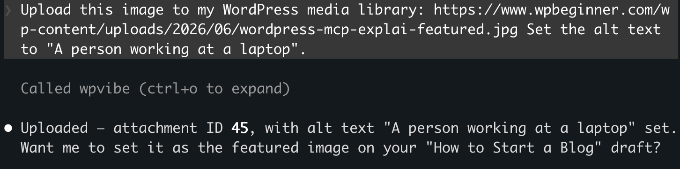
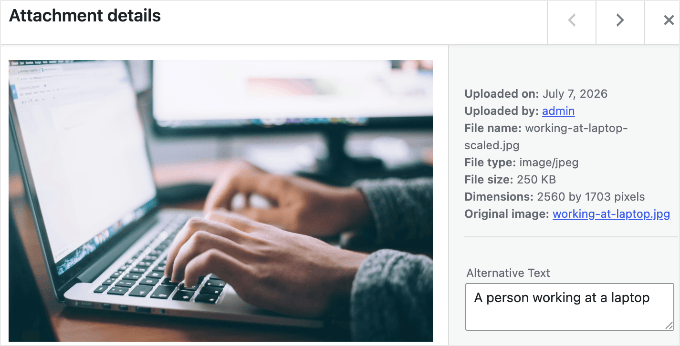
WPVibe validates the source URL, downloads the image, and adds it to your media library with the alt text you specified.
You can reference it in any post from there.
Note: The prompt above uses a public URL, which is the simplest approach. Uploading a local file from your computer works too, but WPVibe will generate a browser upload link as an intermediate step.
3. Manage Your WooCommerce Store
WooCommerce 10.9 ships with native MCP support, which exposes product and order abilities through the same standard that WPVibe uses.
If your site runs WooCommerce, try: ‘Draft a new product called “Summer T-Shirt” with a short description and a price of $29.95.’
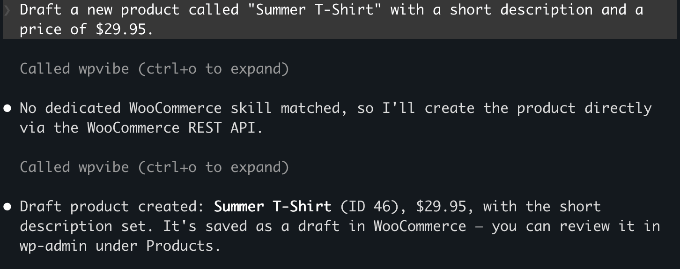
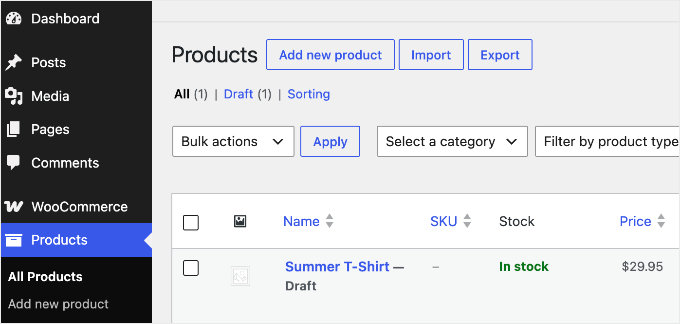
The product saves as a draft in your store. Beyond creating products, your AI can also query orders, update their status, and add order notes, so you can handle routine store admin from the same chat window.
You can see the example below.
The next three examples go beyond WordPress’s built-in actions. On WordPress 6.9 or later, plugins can register their own actions (called ‘abilities’) that your AI discovers automatically, so if you use these tools, you can drive them from the same chat.
4. Optimize Your SEO with AI
If you use AIOSEO, then you can ask your AI to handle common SEO tasks from the chat window. It can check TruSEO scores, generate meta titles and descriptions, and run SEO audits.
My starting point was to ask it to find every post missing a meta description and write one for each.
Try this prompt: ‘Find all posts missing meta descriptions and write and apply them in one go.’
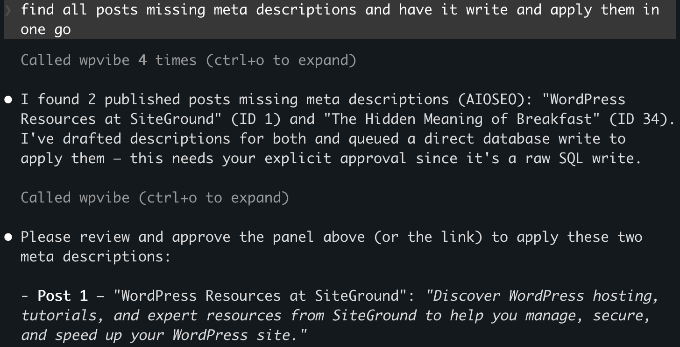
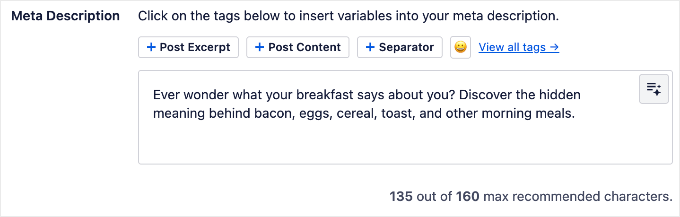
Your AI checks every post, writes the missing meta descriptions, and applies them through AIOSEO in one step.
See our complete AIOSEO setup guide to get it configured first.
5. Manage Landing Pages and Maintenance Mode
If you use SeedProd, then your AI can manage your coming soon page, maintenance mode, and landing page settings without going into wp-admin.
For example: ‘Check if maintenance mode is currently active’ or ‘Enable the coming soon page.’
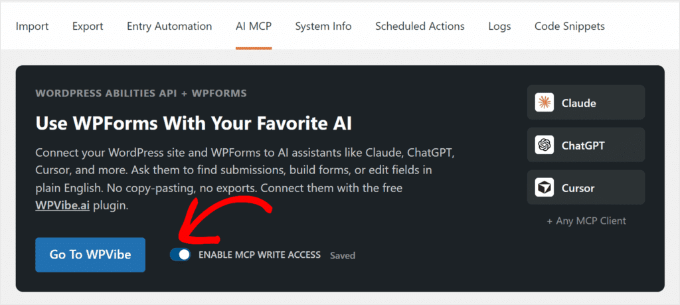
6. Build a Form with AI
If you use WPForms, then your AI can build forms from a plain-English description.
Try: ‘Create a contact form with name, email, and a message field.’ WPForms creates the form in your dashboard, ready to configure and embed.
Before using this, make sure you enable write access under WPForms » Tools.
WPForms Lite supports basic field types. Paid plans add phone, date/time, file upload, and more.
See What Your Site Can Do
You don’t have to guess which of your plugins support this. Because WPVibe automatically discovers every registered ability, you can just ask your connected AI: ‘What can you do on my WordPress site?’
It will list the abilities your installed plugins expose, so the answer stays accurate no matter which plugins you run.
Is WordPress MCP Safe?
I had the same concern when I first tested this. Here’s how WPVibe handles security.
WordPress manages the connection using application passwords, a built-in feature that creates a separate password for each external tool you connect. The AI only gets the permissions of the user account you connected.
So, it’s worth connecting with a limited, non-admin account rather than your main administrator login. If you create a dedicated Editor-role user for the connection, then the AI can only do what an Editor can do.
WPVibe encrypts your application password before storing it, using a separate key for each site, and keeps it on secure servers hosted by Cloudflare. Every connection between your AI client, WPVibe, and your WordPress site is encrypted too, so your credentials are never exposed along the way.
WPVibe also doesn’t store your conversation content. It stays within your AI client.
On the WordPress side, new posts always save as drafts and deletions go to the trash rather than permanent deletion.
To fully revoke access at any time, go to Users » Profile in your WordPress dashboard and scroll down to the Application Passwords section to delete it.
Troubleshooting Connection Issues
Connecting your AI client to WordPress is the step that trips people up most often.
If the connection fails or WPVibe doesn’t appear, then work through these checks:
- WPVibe isn’t in your client’s tool or MCP list – Restart the AI client after saving the config. New MCP servers only load on a fresh start.
- The connection fails silently in Windsurf – Windsurf uses the
serverUrlkey, noturl. The wrong key produces no error message, so double-check it. - Application passwords won’t authenticate – Your site must run on HTTPS. Application passwords don’t work over
http://. - Your AI client can’t reach the site – The site has to be publicly reachable. A local development site won’t connect unless you expose it through a tunnel.
- Authorization keeps failing – Re-check that you pasted the correct MCP server URL:
https://mcp.wpvibe.ai/mcp.
Frequently Asked Questions About WordPress MCP
Is WPVibe free?
Yes. WPVibe has no API key costs and everything in this guide works on the free plan. There is now a paid Pro plan (early-access pricing, $99 per year) that adds higher daily usage limits and priority support, not new features, so you don’t need it for anything covered here.
Does WordPress MCP work with all AI tools?
WPVibe works with Claude.ai (web), Claude Desktop, Claude Code, ChatGPT, Cursor, and Windsurf. Because MCP is an open protocol, any new AI tool that adopts the standard will work with the same WPVibe setup automatically.
Does WordPress MCP work with WordPress.com?
No, not through WPVibe. WordPress.com has its own built-in MCP setup that works differently. This guide covers self-hosted WordPress (WordPress.org) only.
Do I need WordPress 6.9 to use MCP?
No. You can create posts, upload media, and run admin tasks on WordPress 6.0 or later. WordPress 6.9 is only required if you want to use plugin abilities like those from All in One SEO or SeedProd.
Can I connect more than one WordPress site to WPVibe?
Yes. WPVibe supports multiple sites under one free account. Install the Vibe AI plugin on each additional site and complete the site authorization step. Your existing WPVibe account covers all your sites.
What happens if I disconnect WPVibe from my site?
You can remove a site from WPVibe in the plugin admin or on wpvibe.ai at any time. To fully revoke access, also delete the credential under Users » Profile » Application Passwords.
I hope this article helped you get WordPress MCP set up on your site. You may also want to see our guide on the best AI Automation Tools for WordPress.
If you liked this article, then please subscribe to our YouTube Channel for WordPress video tutorials. You can also find us on Twitter and Facebook.
The post How to Connect AI Agents With WordPress using MCP (Step by Step) first appeared on WPBeginner.
-
Dennis Snell: See DATA, CDATA, RCDATA, and PCDATA oh my!
HTML and XML are markup languages based on plaintext files. This means that any given character could be part of a syntax form (a tag, a comment, a character reference, etc…) or it could be representing itself the way it reads in the file literally.
<tag>· Text node</tag>Whenever a character might be ambiguous, both languages require explicit indication of the intent of the character. In HTML this occurs via escaping, while XML allows escaping or wrapping the content in a marked section, specifically a
CDATA section.<tag><![CDATA[<tag>· Text node</tag>]]>These terms confuse me at times, especially since
CDATAandCDATA sectionsare distinct forms of the same content, and it’s easy to conflate each term. This post is here to disambiguate the terms, their meanings, and why they exist.The punchline comes at the end, but the story is hopefully worth the read.
Markup and mixed content
One of the first jobs of a parser for any plaintext-oriented format is to determine if the next input character represents real text or is part of a syntax form that carries special meaning. If it’s a syntax form we would call it markup, but if the characters are part of real text meant for display or rendering or reading then we call it data.
Anything that is not syntax is data.
The interpretation of the next character depends on the region of the document in which it’s parsed. While the rules for syntax forms are complicated1, this post will focus on the data forms.
PCDATA — “parsed character data”
May form: tags, comments, sections, character references, literal text.
Characters in this region could be data or could form the start of a new markup element. It’s “parsed” because it needs parsing before determining what it represents.
The HTML specification renames this to
Data, which is simpler and a bit harder to search for. In XML, however, it’s used in a document-type definition (DTD). When an element may contain content — text — its data model must include#PCDATA. Otherwise the only characters allowable within that element are other elements, comments, and whitespace. XML documents are required to be valid SGML documents, so its own specification adopts the terminology from SGML’s.Those who have worked with DTDs might note that elements in XML may contain
#PCDATAwhile attributes containCDATAinstead. First of all, the#is there only to make it explicit thatPCDATAis referring to the reserved keyword, rather than a<pcdata>element. Secondly, there’s a good reason for this, which is that attributes can only contain text — they can’t contain other elements of markup. If an attribute value could contain a<span>element, for example, then the attribute value would need to be#PCDATAinstead, but this is prevented by design.PCDATA actually contains more than just literal text and elements. In addition to comments, processing instructions, and other node-like syntax, one important feature of PCDATA is the character reference. These make it possible to represent characters that would conflate with syntax (such as ‘
<’ —<) or which might be cumbersome to enter on a keyboard (such as ‘§’ —§). When parsing, each character in these sequences neither creates an element nor displays as the text itself; rather, the entire sequence is parsed and translates into the character it refers to.HTML pre-specifies a fixed set of named character references, but any Unicode code point may be referenced by its decimal or hexadecimal numeric index. While XML also allows referencing code points by their index2, it only pre-specifies the five named characters which correspond to its main markup introducers:
<,>,&,', and". In XML, any additional named character references are created through the DTD by defining entities.CDATA — “character data”
May form: [character references], literal text.
If a character isn’t markup, then it’s character data, which means that it’s representing its literal self or it’s part of a character reference. Once the parser has entered this region it will not create markup elements.
CDATA is the most confusable kind of character data; this is because there are many kinds of CDATA that share the same name:
- XML attributes may contain CDATA, where character references are decoded.
- XML CDATA sections only contain CDATA, but character references are not decoded.
- HTML kind of has the same CDATA sections, but only in foreign elements (inlined SVG and MathML elements).
- SGML elements may be declared to have a CDATA content model, in which case all content until the appropriate closing tag is to be parsed as character data, where character references are not decoded.
CDATA sections contain only literal text
Many people are familiar with
CDATA sections, but it took me far longer to understand them than my intuition led on. They are the vestige of SGML “marked regions” which tell the parser to handle a specific range of bytes in a special way. TheCDATAsection is one of those, which tells the parser to completely turn off until it reaches]]>.<![CDATA[literal characters only in here]]>It had other marked sections, however, which served different purposes.
<![IGNORE[everything in here is ignored; it doesn’t exist.]]><![INCLUDE[in here things <em>do</em> exist as normal.]]><![RCDATA[read on to learn about RCDATA!]]>The
IGNOREandINCLUDEsections may seem strange, since SGML already has comments, andINCLUDEeffectively does nothing, but the sections can be marked by replaced entities, making for conditional inclusion which can be overwritten via command-line arguments when invoking the SGML parser.<!ENTITY % review-only "IGNORE">...<![%review-only;[<aside>Add `-Dreview-only=INCLUDE` when building drafts.This note won’t appear otherwise.</aside>]]>XML only retained CDATA sections from SGML, while HTML never included them. They are useful because they are so easy to parse. All characters inside of them are to be treated as literal text, up until the first occurrence of the terminating
]]>. Unlike elements, the marked sections do not nest.There are no CDATA sections in HTML
The Internet is full of discussions about the use of CDATA sections in HTML, but there are no such things, mostly. HTML itself is an amalgam of pure HTML and embedded SVG and MathML. Content inside of those embedded SVG and MathML elements is parsed differently, and within this “foreign content” there are
CDATA sectionnodes.When something which look like a CDATA section appears in an HTML document, it’s transformed into a “bogus” HTML comment and considered a snippet of malformed markup. To make things more confusing, the parsing rules differ inside an HTML document for these regions depending on whether they are found within HTML elements or foreign elements.
- When a real CDATA section appears within SVG and MathML, it parses as in XML or SGML — everything is literal text until the nearest
]]>. - When a malformed CDATA look-alike appears in an HTML element, it gets special treatment — the parser only turns off until the nearest
>. This means that these sections end even without a closing]]>, and when they do, all of their contained content disappears from the page.
That small difference confuses naïve parsers and is a regular source of bugs.
<div><![CDATA[There are no tags in here.]]></div><svg><text><![CDATA[<none> here either.]]></text></svg><div><![CDATA[But there <em>are</em> tags in here]]></div>the section ends here ╯ ╰ start of a real end tagThe following is the equivalent markup to the third line.<div><!--But there <em-->are</em> tags in here]]></div>SGML contains CDATA regions outside of marked CDATA sections
SGML made it possible to define more kinds of content than XML does for a given element. For example, an element in SGML can be declared to have a CDATA content model, in which case the element itself behaves like a CDATA section. All characters after the opening tag are treated as literal text until the parser finds the nearest appropriate end tag3. XML rejected this ability because it increases the complexity of the parser and requires that every document also contains a full DTD when parsing. For example, if an element were declared to have CDATA content, then
a <at> bwould represent that literal string; on the other hand, if it were declared like any other normal element, it would have three children: “a”, the<at>opening tag, and “b”.<!ELEMENT verbatim - - CDATA>...<verbatim>There are <no> tags in here, because this is CDATA,but you wouldn’t know without reading the DTD,overcomplicating the demands on the parser.</verbatim>These kinds of elements do exist in HTML, though a few were modified when HTML5 was standardized in 2008. Inside of the elements, the parser essentially turns off, which makes them easy to parse and can help avoid the need to extensively escape content. These elements are, of course,
<script>and<style>4.Were it not for the CDATA declared content model, every angle bracket and ampersand would have to be escaped in included JavaScript and CSS. In XHTML this was required, because it had no CDATA declared content model (since it was XML)5.
All text in XML is CDATA
Herein lies the most-confusing aspect of discussing CDATA — XML contains CDATA sections as well as CDATA as normal text. After parsing there is no distinction between
<tag>and<![CDATA[<tag>]]>in the parsed content.Many XML generators (or serializers) provide two mechanisms for creating text content: one wraps text in a
CDATA sectionand leaves the text as it came (apart from avoiding including the terminating sequence); the other escapes syntax characters instead. While there are times where it would be appropriate to intentionally pick one over the other, a good library design would at least offer a third mechanism (if not only providing this third mechanism) which simply produces CDATA, itself determining when to wrap and when to escape6, and whether or not to produce chunks of wrapped text interspersed with chunks of escaped text.The real difference between these two kinds of CDATA is purely presentational in the source document, as the XML snippet below only contains one text node, not two. Creating CDATA does not imply creating a
CDATA section!<rule><![CDATA[#X13<d&r>]]> (&pp;4 &ss;3.11)</rule>RCDATA — “replaceable character data”
May form: character references, literal text.
There’s one more confusing designation for characters in the HTML and XML input streams: RCDATA. RCDATA is almost identical to CDATA, except that in contexts where CDATA does not decode character references and entities, RCDATA will decode them into CDATA. This is confusing, because in the context of an XML attribute, the
CDATAdesignation in a DTD automatically implies that character references are decoded, unlike theCDATAsections in content.To this end there are no RCDATA attributes, since character references are always decoded inside attribute values. The RCDATA declaration is like the SGML CDATA content declaration: all characters following the opening tag for this element will be treated as text until the nearest matching closing tag (the difference being only that character references are recognized and decoded).
It’s worth remembering that XML rejected the CDATA content type because of how it complicates parsing, and it also rejected the RCDATA type. On the other hand, RCDATA was incorporated into HTML, but statically so. HTML has no configurable DTD, but in its specification two elements contain RCDATA content:
TITLETEXTAREA
While it’s easy to comprehend the way that
<textarea>works, and that’s probably because we are used to entering text into one on a web page, the behavior of<title>is consistently confused in all manner of programming languages, platforms, and HTML-parsing code.The TITLE element only contains character data — it cannot contain other markup. The parsing is among the easiest sections of an HTML document to parse: once the
<title>opening tag is detected, the parser can capture everything until the nearest</title>closing tag. Everything it captured is literal text, after decoding character references.<!-- the title is "<title>" --><title><title></title><!-- equivalent HTML --><title><title></title>This complicates content management systems like WordPress which allow posts to have HTML in their post titles, because a page can show richly-formatted article titles which cannot be represented in the browser tab’s label, and care must be taken to extract the plaintext content from that HTML before display in those contexts.
Coda
HTML and XML both speak about different kinds of characters in their source documents and content models, which traces from the complicated ways that SGML documents could be constructed. SGML’s complexity almost always stems from the central idea that computers should do extra work to remove the hassle for humans to enter structured content in plaintext documents.
HTML, inspired by SGML, adopted some of the names and mechanisms for parsing those regions of text in distinct ways, but codified a single parsing standard independent of SGML. When XML was later developed, it was meant to form a simplified subset of SGML. This subset flipped the tradeoffs, leaning on humans performing extra work to remove the hassle for computers to parse structure in plaintext documents. For these text forms, this meant rejecting a few of the constructs while retaining others.
This is also another demonstration of how balanced tags are not enough to have well-behaved HTML with a naïve parser. A well-formed XML document may be parsed with a terse PERL script and regular expression, but HTML relies heavily on the context in which characters are found. Any HTML parser must know the special rules for each kind of element’s content model.
In summary
- When it’s unclear whether a character forms text or markup, that is PCDATA. Once parsed, there is no PCDATA anymore; it’s either a form of DATA or MARKUP.
- All text nodes in HTML are “DATA.”
- “CDATA” just means “character data” and means that after parsing, the content is text. It does not indicate whether character references are to be decoded or not; that comes from the region in the document, based on its context.
- There are no CDATA sections in HTML7.
- All text nodes in XML are CDATA, but only after being parsed.
- CDATA sections offer a convenient way to avoid escaping, but are indistinguishable from the equivalent escaped text.
- HTML contains two special RCDATA elements which only and always contain a single text node child:
<title>and<textarea>. Everything until the closing tag will be parsed as text, even if it looks like markup.
This post is already long and still over-simplifies the picture. SGML is a rich and robust specification and includes
NDATAandSDATA, HTML includes a latchingPLAINTEXTparsing mode in which the rest of the entire document is parsed as literal character data, and there are other surprising goodies in how entities interact with the character mode.Thanks for making it through to the end, or jumping directly here if you couldn’t wait.
- As an example, each part of a tag — its name, attribute names, attribute values — carries its own parsing rules. The same is true for comments, DOCTYPE declarations, and every other syntax form.
 ︎
- XML only allows character references to the characters in its “character set,” which is almost all Unicode code points, but excludes some control characters and U+FFFE and U+FFFF. ︎
- Because SGML was designed to minimize the amount of necessary syntax, it’s not necessary to have a full end tag for an open element, but that’s a simple-enough model to understand the concept. ︎
- The
<style>element is straightforward, but the<script>element has its own complicated modification of the CDATA content model. It’s mostly CDATA, but makes it possible to escape the closing tag so that very old pages won’t break. HTML also applies this parsing mode for the<iframe>,<noembed>,<noframes>, and<noscript>elements (as well as for the deprecated<xmp>element), but these nominally should have no content inside of them (or shouldn’t be used); applying the CDATA content model prevents creating other elements as their children.︎ - Frustratingly, in XHTML one must escape JavaScript and CSS in the page to avoid parsing failure, while in HTML one must not. This alone makes for a complicated stage in any reliable HTML/XHTML converter. ︎
- Wrapping a language like HTML inside a CDATA section is a convenient way to represent the HTML visually and retain the ability to easily modify it, but entities present a problem. The serializer must either pre-translate the entity into its resolved character content, losing the macro-like behavior and its name; or leave the entity in place, thus nullifying it because it will not be recognized as an entity on parse. However, in such a situation, a serializer is free to terminate the CDATA section, append the entity, and open a new one to continue. ︎
- As mentioned in the discussion about CDATA, embedded SVG and MathML elements can contain CDATA sections, but these are not technically HTML elements. ︎
-
Gutenberg Times: WordPress 7.0.1 Fixes Registration Spam, wp_kses() CSS Corruption, and 7.0 Admin Design Glitches
WordPress 7.0.1 is now available. As the first maintenance release of the 7.0 cycle, it’s strictly a bug-fix release: every included ticket addresses either a regression introduced during 7.0 development or an issue intentionally deferred at the end of the cycle.
The release ships fixes for 17 core Trac tickets and 14 Gutenberg PRs. Because this is a maintenance release, sites with automatic background updates enabled will update to 7.0.1 automatically — everyone else should update as soon as possible. Here’s what stands out for each audience.
Kudos to release lead Aaron Jorbin and his team for pushing this release over the finish line and getting it into hands of WordPress users quickly.
The most important fixes for end users
Registration page spam is shut down (#63085). The account registration page could be abused to send “Login details” spam emails from your site. This is arguably the most impactful fix in the release for anyone running a site with open registration — it protects both your users’ inboxes and your domain’s email reputation.
The 7.0 admin reskin gets its rough edges sanded off. WordPress 7.0’s refreshed admin design shipped with a handful of visual glitches that this release cleans up:
- Form elements are now standardized in the mobile viewport (#64999)
- The image editor’s scale and crop inputs no longer mismatch in size, and the info icon uses the new color scheme (#64937, #65428)
- The publish settings panel no longer crowds its primary action buttons together (#65286)
- The Media Library’s loading spinner is properly aligned in the modal filter toolbar, and the search bar no longer jumps position after a search (#65275, #65296)
- A “black flash” that briefly appeared on wp-admin pages before the interface finished loading is gone (Gutenberg #78493)
Emoji behave correctly again. Two related fixes: the emoji detection script is once more printed in the admin (#65310), and certain characters are no longer incorrectly replaced by Twemoji images (#64318).
Accessibility improvements to the new revisions experience. The Visual History / Revisions feature introduced in 7.0 receives several accessibility fixes: focus now moves to the revisions slider when entering revisions mode, and changed blocks are marked with a CSS outline as a secondary, non-color indicator — important for users with low vision or color blindness (#65122, Gutenberg #77530, #78393, #79691).
The most important fixes for developers
wp_kses()no longer corrupts valid CSS (#65270). Since 7.0 RC4,wp_kses()could mangle legitimatebackground-image: url(…)declarations into a brokenstyle=")"attribute. If your theme or plugin outputs inline background images through KSES-filtered content, 7.0.1 restores expected behavior — any workarounds you shipped can now be removed.global-styles-inline-csscan be dequeued again (#65336). Since 7.0, developers were unable to remove the global styles inline stylesheet. If your build pipeline or performance optimization strips this and re-serves it another way, that control is back.PHP 8.5 compatibility fix in
wp_get_attachment_image_src()(#64742). An incorrect array access triggered issues under PHP 8.5. If you’re testing sites on newer PHP versions, this removes one blocker.A removed Navigation function returns as a deprecated shim (Gutenberg #78484).
block_core_navigation_submenu_render_submenu_icon()was removed in 7.0, breaking themes and plugins that called it directly. It’s restored as a deprecated shim — but treat this as your migration notice, not a reprieve. Update any code that references it.Editor state management fixes reduce false “unsaved changes” warnings. Two Gutenberg fixes matter here:
- controlled/mode block changes are now marked non-persistent (#79350), and
- related navigation entities are no longer dirtied during passive renders (#79000).
Together these should mean fewer spurious dirty states and a cleaner undo history — a quality-of-life improvement if you build with template parts and navigation blocks.
Block Visibility: “hide everywhere” keeps working after a block opts out of visibility support (#65389). If you register blocks that disable visibility support, previously hidden instances now stay hidden as expected.
How to update
You can update directly from Dashboard → Updates in your site’s admin, run
wp core updatewith WP-CLI, or download WordPress 7.0.1 from WordPress.org and install it manually. Sites that support automatic background updates for minor releases will begin updating on their own shortly.The full ticket list is available in the release candidate announcement, Trac report 4, and the 7.0.x editor tasks board on GitHub.
What’s next: WordPress 7.1
With 7.0.1 out the door, attention turns to the next major release: WordPress 7.1 is scheduled for August 19, 2026. To see what’s planned for the release, check out the Roadmap to 7.1 on the Make WordPress Core blog.
-
WordPress.org blog: WordPress 7.0.1 Maintenance Release
WordPress 7.0.1 is now available!
This minor release includes fixes for 31 bugs throughout Core and the Block Editor, addressing issues affecting multiple areas of WordPress including the block editor, admin ui, and media. For a full list of bug fixes, please refer to the release candidate announcement.
WordPress 7.0.1 is a short-cycle maintenance release. The next major version of WordPress will be 7.1; it is scheduled for release on 19 August 2026 at WordCamp US.
If you have sites that support automatic background updates, the update process will begin automatically.
You can download WordPress 7.0.1 from WordPress.org, or visit your WordPress Dashboard, click “Updates”, and then click “Update Now”. For more information on this release, please visit the HelpHub site.
Thank you to these WordPress contributors
This release was led by Aaron Jorbin, Brian Haas, Carlos Bravo and Estela Rueda.
WordPress 7.0.1 would not have been possible without the contributions of the following people. Their asynchronous coordination to deliver maintenance fixes into a stable release is a testament to the power and capability of the WordPress community.
Aaron Jorbin, Abdur Rahman Emon, Abhishek Kumar, Adam Silverstein, Adam Zieliński, Aditya Singh, Aki Hamano, Andrea Fercia, Andrei Draganescu, Andrew Serong, annezazu, Ben Dwyer, Brian Coords, Brian Haas, Carlos Bravo, cogdesign, Dan Luu, Daniel Richards, Darshit Rajyaguru, David Baumwald, Dennis Snell, Dhruvang21, Ella Van Durpe, Erick Wambua, Esteban, Estela Rueda, George Mamadashvili, Greg Ziółkowski, Himanshu Pathak, Hit Bhalodia, Huzaifa Al Mesbah, iflairwebtechnologies, James, Jarda Snajdr, Jb Audras, Joe Dolson, Joen Asmussen, Jon Surrell, Jonathan Desrosiers, Karthikeya Bethu, Khokan Sardar, Lucian R., luismulinari, Mahammad Darvishov, Manhar Barot, Marco Ciampini, Marin Atanasov, Maryam Sultana, Masum, Miguel Fonseca, Miroku, Mohammed Noumaan Ahamed, Mukesh Panchal, Mustafa Bharmal, Nik Tsekouras, Noruzzaman, Ozgur Sar, Peter Wilson, Presskopp, Rahul Kumar, ramonopoly, Riad Benguella, Rishabh Gupta, Roshni Ahuja, Sainath Poojary, Saksham Sharma, SAndrew, Scott Reilly, Sergey Biryukov, siliconforks, Stephen Bernhardt, Swanand M, Takashi Kitajima, Terence Eden, threadi, Tushar Patel, Umesh Nevase, WebMan Design | Oliver Juhas, Weston Ruter, Yogesh Bhutkar, Yusuf Mudagal
How to contribute
To get involved in WordPress core development, head over to Trac, choose a ticket, and join the conversation in the #core channel. Need help? Check out the Core Contributor Handbook.
Props to @jorbin for proofreading.
-
Open Channels FM: The Paradox of Empowerment in a Disruptive Era
Tech feels wild and unpredictable, yet super empowering. Success now hinges on broad awareness and curiosity, not just deep specialization. Embrace the chaos.
-

Jonathan Desrosiers: 13 Years Contributing to WordPress
Thirteen years ago today, I received my very first props for contributing to WordPress Core. If my WordPress contribution journey were a person, it would now be a teenager. It’s pretty wild to think about, but I’ve now been contributing to the WordPress project in some way for a third of my life!
What is a “prop”?
In the WordPress open source project, community participants receive credit for contributing to a given change or deliverable by receiving “props.”
Props should be given to all those who contributed to the final commit, whether through patches, refreshed patches, code suggested otherwise, design, writing, user testing, or other significant investments of time and effort. Usernames are parsed for the credits list and WordPress.org profiles.
The names of all the contributors who helped make a specific release possible are collected in the weeks leading up and added to the Credits API, which powers the Credits page in the WordPress dashboard.
To date, I have been listed on the Credits page for 24 consecutive releases starting with 4.7, and 29 of the 35 releases overall since my first credited contribution in WordPress 3.6 “Oscar”, alongside 224 other contributors.
Every year is a bit different than the last, but I can confidently say that this past year has been significantly different. What it means to develop software or contribute to open source is changing rapidly with advanced AI innovations seemingly every day combined with these tools being accessible to more people than ever before. But throughout all this, one truth holds strong: open source software is more important than ever.
Looking Back
It seemed only fitting for me to instruct AI to analyze my contribution activity over the last 365 days to try and find anything interesting!
Prompt
Today is the 13th Anniversary of my first credited contribution to the WordPress project. I try to write a blog post each year to mark the occasion.
I’m looking for ideas for this years edition. Please go and read all of my past posts (accessible here at this category feed https://jonathandesrosiers.com/category/contributing-anniversaries/feed) and give me 10-12 ideas for what to focus on this year. You can also look through the other content on my site for other ideas.
After you do that, I want you to look at the git history for the
wordpress-developandgutenbergrepositories between July 8, 2025 and yesterday (July 7, 2026). I want you to parse the logs to summarize my activity and find some particular ways to analyze the data that are interesting.Be creative! These posts are the most fun when I am able to find some unique insight into a year’s worth of contributions.
Results
Your year 13 in numbers (Jul 8 2025 → Jul 7 2026)
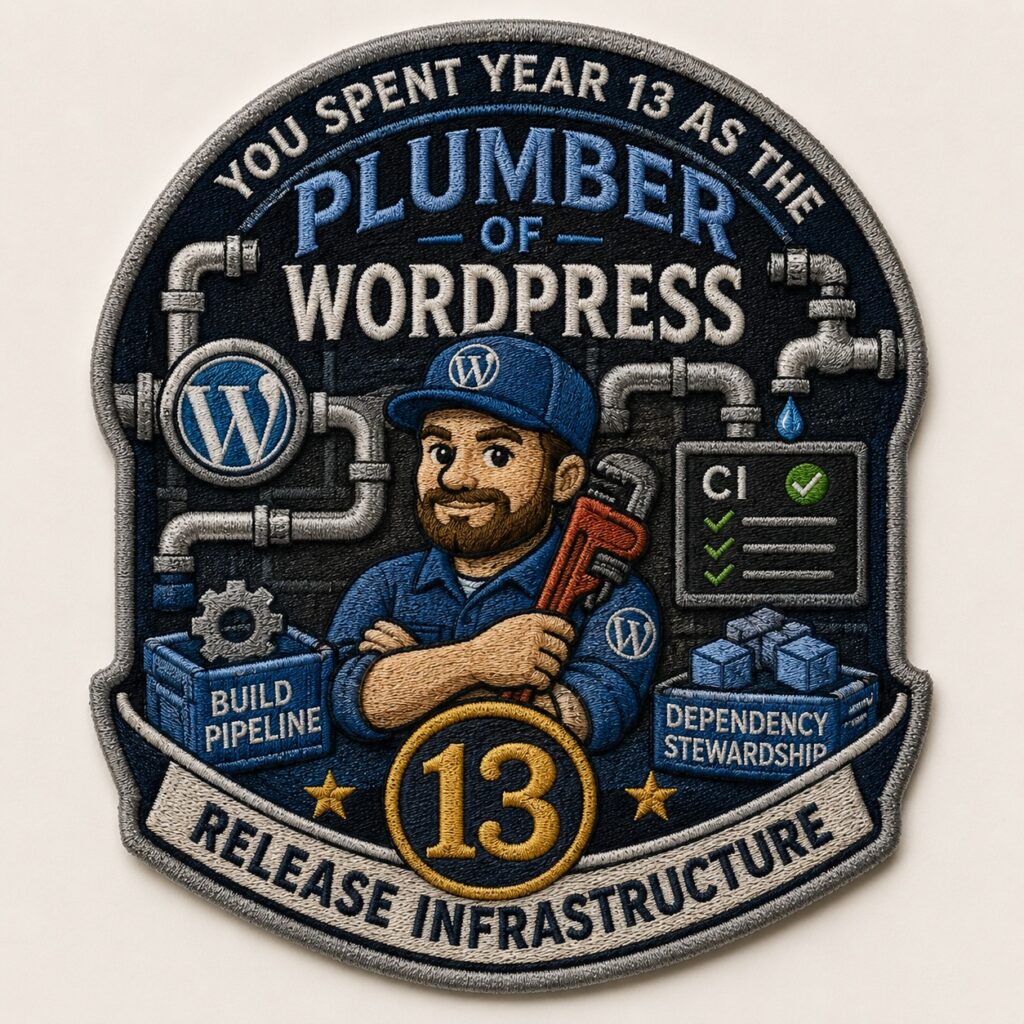
Metric Value Core commits authored & committed 119 (~7% of all 1,707 core commits this cycle) Additional commits crediting you (props received) 97 → ~216 credited touch points in core alone Lines changed +41,746 / −21,940 across 656 file-changes Unique Trac tickets 69 Gutenberg PRs authored 24 (+108 co-authored/credited) Reverts you committed 6 The headline: 80 of your 119 core commits (67%) are “Build/Test Tools.” Add Tests + General and it’s ~80%. You spent year 13 as the plumber of WordPress — CI, build pipeline, dependency stewardship, release infrastructure.
The most interesting angles the data surfaced
- The nocturnal committer. ~50 of your commits land between midnight and 4am. Tuesday (37) and Thursday (31) are your peak days; Saturday is nearly dead (3).
- The month that didn’t exist. January 2026: zero commits. March 2026: 40. Your cadence is a heartbeat synced to the 6.9 and 7.0 release cycles, not the calendar.
- The June 30th ritual. You bumped Gutenberg’s pinned hash seven times in a single day (v22.8.0 → v23.4.0) — a whole quarter of catching-up compressed into one sitting.
- Supply-chain quiet work. Pinning full-length action SHAs, replacing abandoned third-party actions, migrating release logic to a GitHub App, ca-bundle updates — you spent the year hardening the software supply chain nobody thanks you for.
- Keeping the ancient libraries breathing. lodash, underscore, backbone, getID3, Twemoji — you’re the caretaker of WordPress’s legacy vendored code.
- Future-proofing the matrix. MySQL 9.5/9.6/9.7, MariaDB 12.1, PHP 8.5 (HEIF/HEIC) — you test tomorrow’s platforms today.
- A first, quietly historic commit: “Include example for disclosing AI usage” — you helped write core’s early AI-disclosure norms.
10–12 ideas for the year-13 post
- “The Plumber’s Year: 67% of My Commits Were Infrastructure.” Own the unglamorous. A love letter to build/test/CI work — the contributions that never show up in a release announcement but without which nothing ships. This is your strongest, most authentic angle.
- “Confessions of a Nocturnal Committer.” Fun, human, data-driven: your midnight-to-4am commit cluster, Tuesday/Thursday peaks, the dead January. Chart your year as a heartbeat and reflect on what it says about maintainer rhythms (and sustainability/burnout).
- “216 Times.” Companion to your 2024 props post, flipped: this year you received credit ~216 times in core (119 committed + 97 propped). Explore the two halves of a committer’s fingerprint — the work you land yourself vs. the work you shepherd for others.
- “The Boring Commits That Keep 40% of the Web Safe.” The supply-chain security angle: pinned SHAs, abandoned-action replacement, the GitHub App migration, ca-bundle. Frame maintenance-as-security — timely and underappreciated.
- “I Test the Future So You Don’t Break in It.” MySQL 9.7, MariaDB 12.1, PHP 8.5 — a piece on being the person who runs tomorrow’s platforms against today’s code, and why the test matrix is a form of care.
- “The Commit I’m Proudest Of Was One Line About AI.” Use “Include example for disclosing AI usage” as a springboard into how WordPress (and you) navigated AI’s arrival in the contribution workflow in 2025–26. Very of-the-moment.
- “Anatomy of a Revert.” Six times this year you reverted your own or others’ work. A candid, senior-contributor essay on why reverting is a feature not a failure — iteration, humility, and trunk stability.
- “A Year in Dependencies.” The stewardship story — lodash/underscore/backbone/getID3/Twemoji. What it means to be the caretaker of code written a decade ago that you can’t just delete. Legacy as responsibility.
- “Who I Built With.” Refresh your collaborator lens for year 13: westonruter (24), jorbin (22), johnbillion (15), peterwilsoncc (14), wildworks (13)… Name the people behind the props lines and tell a story or two about the work you shared.
- “The Shape of a Release Cycle, Drawn in Commits.” Overlay your monthly commit counts on the 6.9 and 7.0 timelines — the March spike, the December bundled-themes push, the quiet stretches. Show readers what a maintainer’s year looks like mapped to what shipped.
- “Same Job, New Tools: Automating Myself Out of the Loop.” Your Gutenberg PRs are almost all release automation — GitHub App auth, GHCR publishing, reproducible builds, Dependabot. A reflective piece on spending your labor building the machine that does the labor, and what that means for the next generation of contributors.
I haven’t validated any of these numbers, but they do seem relatively accurate at first glance. I had ChatGPT create an embroidered patch that reflects the summary above.
And some of those writing suggestions are pretty good ideas! I’m out of time for today, so I’ll file these in the backlog for another day. But here’s to another year of helping the world find their voice to share their stories using WordPress.

Past Milestones
“Props” Anniversaries: Ten, Eleven, Twelve (archive).
Commit-iversaries: Two, Five, Six, Seven (archive).
Featured image credit: CC0 licensed photo by Mark Westguard from the WordPress Photo Directory.
The post 13 Years Contributing to WordPress appeared first on Jonathan Desrosiers.
-

Matt: Code for the People

Lights! Camera! Action!
Todd Spangler at Variety writes: Automattic’s ‘Code for the People’ Documentary Is a Rallying Cry for Users to Fight for the Open Internet, from the NYC premiere last week.
I’m looking forward to the San Francisco premiere of the documentary, and then tomorrow everyone can stream it for free on codeforthepeople.com! Appearances by Anne McCarthy, Beau Lebens, Eric Binnion, Ian Stewart, Marjorie Asturias, Mary Hubbard, Matías Ventura, Matthew Miller, Paolo Belcastro, and Paul Maiorana.
We need to tell the story of Open Source in as many ways and places as possible. It’s never been more critical.
Film is new to us, and it’s funny how quickly things change: There’s a segment with a few “OpenAI not open” sound bites, but to their credit, they have been releasing open-weight models (Safeguard is particularly interesting). That said, the top open-weight models are all from China, save for Nvidia’s Nemotron, in ~12th place.
When I went to the first WordCamps in Beijing and Shanghai in 2009, it was a very different time. They were the biggest in the world at the time! I don’t think you could take photos in Tiananmen Square as freely as I did then; now to visit I think you need an appointment, ID checks, and security checks.
Even during WordCamp, it felt like the freedom of Open Source was in high demand, but it also created a lot of fear. I found out later that one of the student volunteers who helped their professor organize everything had been taken in for hours of questioning following the event.
On that trip, I saw how fine-grained the Great Firewall could be when individual posts (IIRC, about bad milk from a factory harming babies) wouldn’t load, but the rest of the site would. WordPress.com had been totally blocked, taking about a quarter of our traffic at the time, but behind the Firewall, Open Source continued to thrive and grow, and now the frontier open models are being driven by China in a way I never would have predicted!
Once you’ve had a taste of freedom, it’s hard to go back.
-

Finaliza el tercer curso de verano de UNED Guadalajara en el EJE de Azuqueca

La vida no es perfecta y en cierta forma, somos los capitanes de nuestro propio viaje vital. Existen los traumas, en mayor o menor grado, los traumas con T mayúscula y con t minúscula, pero es importante saber abordarlos con ayuda profesional y un tratamiento terapéutico adecuado, que se base no sólo en la neuropsicología sino también en las fortalezas del paciente. El éxito reside en que vuelva a creer en él, que asuma -si llega el caso- lo imposible, que no se avergüence de sentir tristeza ni de equivocarse y consiga vivir una vida lo más feliz posible, recibiendo cuidados -desde fuera o de sí mismo- y siendo capaz de reescribir su guion vital, algo que comienza a diseñarse desde la cuna y gracias a un apego correcto.
De todo ello, se ha hablado en el tercer Curso de Verano de UNED, celebrado en el Espacio Joven Europeo (EJE) de Azuqueca de Henares, bajo el título ‘Más allá del trauma: abordajes clínicos frente a un fenómeno complejo’, en el que han participado nueve psicólogos a lo largo de tres jornadas.
“El abordaje del trauma debe ir más allá de la etiqueta diagnóstica”, señala la directora del curso, la psicóloga Genny Lubrini, profesora titular de la UNED. “Debe enfocarse en la seguridad, la alianza terapéutica y la reconstrucción del sentido de sí mismo, integrando el enfoque neuropsicológico, la regulación emocional y el apego”.
Terapia y cuidados
Unos 200 alumnos han asistido a este curso de manera presencial y online, que ha permitido un acercamiento multidisciplinar al trauma, un problema que, según el psicólogo y psicoterapeuta Arun Mansukhani ocurre “sobre todo, en espacios interpersonales íntimos”.
Desde la revisión histórica del término, se han abordado los desafíos que presenta el trauma a la hora de evaluarse pero también conceptos como disociación -la desconexión entre la mente y la realidad de lo que se está viviendo en ese momento y que actúa como mecanismo de defensa ante un trauma-, la futilidad -la experiencia emocional profunda que surge al enfrentar algo que no puede modificarse-, el pensamiento complejo –capaz de tratar, dialogar y negociar con lo real- o la compasión, “la valentía de mirar a los ojos y afrontar”, señala el psicólogo y profesor de la UNED, Félix Hernández Lemes, coordinador además de este curso.
A lo largo de las diferentes sesiones, se ha reflexionado sobre el impacto transformador que tiene aceptar lo imposible, la importancia del trabajo con el trauma relacional desde la compasión y el cuidado; la relevancia de saber cómo queda el guion de la vida después de la experiencia traumática o cómo funciona la psicoterapia de pareja. Finalmente, el curso ha abordado la parte clínica, dando espacio también para entender y conocer cómo se comporta el cerebro cuando hay un trastorno neurológico funcional así como la intervención en partes, la terapia de reprocesamiento y el trauma complejo.
“El iceberg clínico muestra que aunque los motivos de consulta sean la ansiedad o la fibromialgia y la depresión, los problemas reales son vínculos de apego rotos, un dolor silenciado o las experiencias infantiles adversas”, afirma Hernández Lemes.
Este miércoles por la tarde arranca el cuarto Curso de Verano, que lleva por título ‘Violencia de género: perspectivas, recursos e intervención integral’, dirigido por Pedro Javier Amor, donde se aportará una visión práctica e integral sobre este problema.